
A LinkedIn Search API helps users discover people and companies, refine results with valid filters, and enrich the specific records they choose to evaluate. Build discovery and enrichment as separate stages: return lightweight search results first, then retrieve deeper profile or company data after the user selects a record.
This pattern gives sales intelligence platforms, recruiting tools, CRMs, and internal research products a clearer interface, more intentional API usage, and a simpler path from search to action.
EnvoAPI is an independent third-party data API and is not affiliated with or endorsed by LinkedIn.
Explore the API · Browse the API reference
What Is a LinkedIn Search API?
A LinkedIn Search API enables an application to query structured professional data with keywords and supported filters. It is useful when users know the type of person or company they need but do not yet know the exact profile or account.
A well-designed professional search product separates three actions:
| Action | What it does | User moment |
|---|---|---|
| Search | Finds matching people or companies from a keyword and supported filters | “Who or which accounts match?” |
| Filter discovery / typeahead | Resolves valid locations, companies, industries, and other supported values | “Help me narrow this search.” |
| Lookup / enrichment | Retrieves deeper data for one selected record | “Tell me more about this profile or company.” |
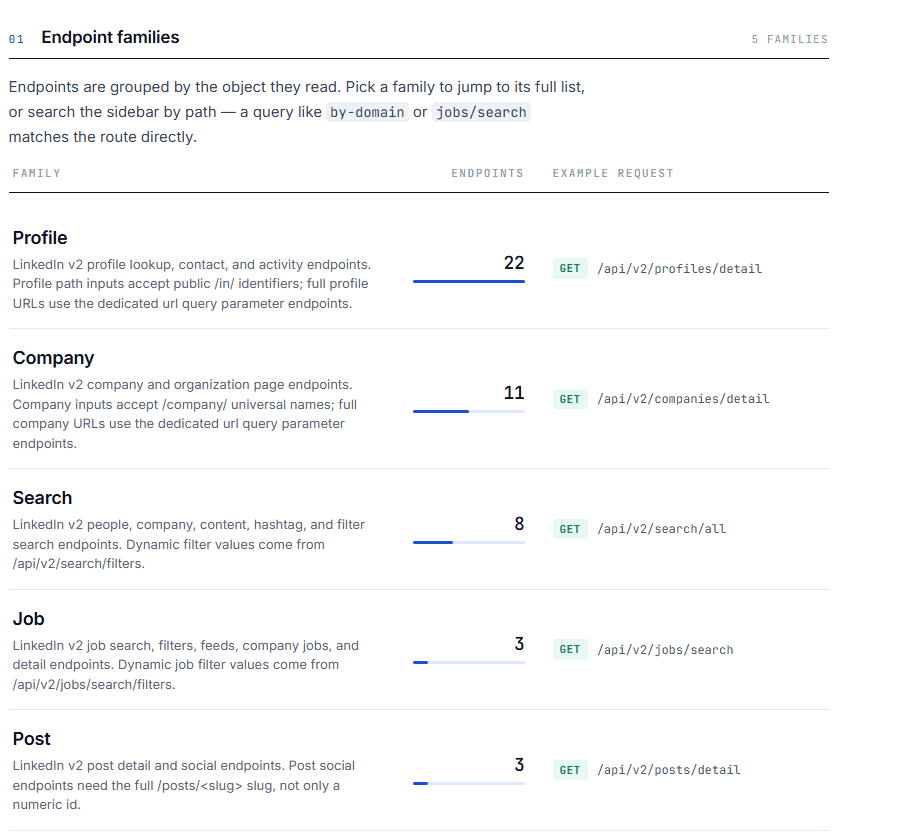
EnvoAPI supports people, company, job, and search workflows through a consistent developer-focused API. Its Search family covers people, companies, posts, hashtags, locations, and dynamic filters, while Profile and Company endpoints support deeper record lookup and enrichment.
The product rule is straightforward: use search to create a shortlist, then use enrichment when a user opens, saves, scores, compares, or routes a selected record.
Official LinkedIn APIs and EnvoAPI
Official LinkedIn APIs and an independent professional-data API serve different implementation models.
LinkedIn’s official APIs use OAuth 2.0 authentication, with data access governed by individual products, permissions, app authorization, and partner programs. Available permissions are tied to specific use cases, such as authenticated-member data, posting, advertising, Sales Navigator, or compliance integrations.
EnvoAPI uses an API-key model designed for server-side enrichment, people search, company search, and job-data workflows. Developers can integrate through one versioned API host and a consistent response structure.
This distinction matters when planning a search product:
- Official LinkedIn integrations require the relevant product access, permission scopes, and OAuth implementation.
- EnvoAPI requests use a server-side X-API-Key.
- Official access should not be treated as an unrestricted global professional-profile search product.
- EnvoAPI search and enrichment should be implemented only for permitted business use cases and in line with applicable privacy, data-protection, and platform requirements.
Do not frame public-data access as automatically lawful in every jurisdiction or use case. The Ninth Circuit’s hiQ decision addressed whether access to publicly available LinkedIn profiles likely constituted access “without authorization” under the U.S. Computer Fraud and Abuse Act; it did not remove separate obligations under contracts, privacy laws, or other legal rules.
Build a LinkedIn People Search API Experience
A LinkedIn People Search API should help users answer one question quickly: “Which professional should I inspect next?” Build around practical user intent rather than a generic list of profiles.
Start with the user’s search intent
People search supports clear workflows:
- Sales intelligence teams find decision-makers by role, company context, and location.
- Recruiting teams discover candidates based on job function, market, and supported criteria.
- Internal intelligence tools search professionals before opening a detailed record.
- CRM workflows identify a likely profile before enrichment or record creation.
Users usually begin with role-based searches such as:
- “VP Sales”
- “Head of Revenue Operations”
- “Software Engineer”
- “Product Marketing Manager”
The keyword communicates broad relevance. Supported filters narrow the results with structured context. For example, a user can search for “Head of Sales,” resolve Singapore through typeahead, and apply a supported company or industry filter.
Do not publish fixed filter lists or parameter names from old examples. Endpoint paths, accepted values, request limits, and response fields must be validated against the current EnvoAPI documentation.
Design result cards for fast qualification
A result card should help users decide whether to open a record in fewer than 5 seconds. Prioritize only the search-response fields that support that decision:
- Name
- Headline
- Current company, when returned
- Location, when returned
- Profile image or neutral fallback
- A clear action: View profile, Enrich profile, or Add to list
Render only fields present in the search response. Reserve detailed career history, education, skills, certifications, activity, and available public contact data for the enrichment view.
This division creates a useful boundary: search supports discovery, while profile enrichment supports qualification. Depending on the endpoint and public-data availability, EnvoAPI profile data can include experience, education, skills, certifications, activity, and public contact availability.
Call people search from your backend
Keep the API key outside the browser. The frontend should send keywords and selected filters to a backend endpoint, and the backend should call EnvoAPI.
Browser search form\ ↓\ Your server-side endpoint\ ↓\ EnvoAPI People Search endpoint\ ↓\ Normalized response to the browser
Use this implementation flow:
- Store the EnvoAPI key in a server-side environment variable.
- Send the key with the X-API-Key header.
- Receive a keyword and resolved filter selections from the frontend.
- Check success before reading data.
- Treat meta.error as an actionable API failure, never as an empty-results state.
- Return only the fields required by the search interface.
EnvoAPI documents server-side authentication and a shared response envelope containing success, data, pagination, and meta.
Before releasing production code, confirm endpoint-specific paths, accepted parameters, limits, and response fields in the authenticated API reference. EnvoAPI’s reference is generated from its OpenAPI document.
This server-side adapter also gives the product a stable internal schema. Your frontend can consume normalized personCard objects while your backend adds caching, auditing, scoring, CRM matching, or permission logic later.
Add Typeahead and Search Filters
A capable LinkedIn Search API interface separates keywords, structured filters, and resolved values. This prevents the application from treating every typed phrase as a valid filter entity.
| Input type | Example | Purpose |
|---|---|---|
| Keyword query | “marketing manager” | Captures broad role and relevance intent |
| Structured filter | Company or industry | Narrows results with supported criteria |
| Typeahead selection | “Singapore” selected from suggestions | Passes a resolved value into search |
Build reliable typeahead interactions
Use typeahead to resolve supported filter values. Do not run a full people or company search after every keystroke.
Apply these UX rules:
- Require at least 2 input characters before requesting suggestions.
- Debounce requests by 250–400 ms.
- Cancel or ignore stale requests before displaying results.
- Show loading feedback inside the active input.
- Let users select resolved values rather than rely only on free-text filters.
- Render selected filters as removable chips.
- Provide both Clear all and individual filter removal.
For example, when a user types “Sing,” request location suggestions after the debounce period. When they select Singapore, store the resolved value and use it on the next intentional search request.
EnvoAPI documents dynamic filter discovery through /api/v2/search/filters, allowing product teams to build filter interfaces from supported values instead of maintaining hard-coded lists.
This interaction pattern prevents three common failures:
- Free-text values that do not map to a valid entity.
- Older typeahead responses replacing newer input.
- Unnecessary full-search requests while a user is still typing.

Build a LinkedIn Company Search API Workflow
A LinkedIn Company Search API complements people search. It helps users identify the right account before they find employees, enrich company details, or route the account into a CRM workflow.
Start with account discovery
Company search supports four common workflows:
- Sales teams identify target accounts before finding decision-makers.
- Market researchers build a company set around an industry, location, or market theme.
- Product users validate an organization before opening employee search.
- CRM workflows resolve a company from a domain or another available identifier.
EnvoAPI provides company search and company enrichment workflows for firmographics, employees, products, posts, open roles, and company insights, depending on the endpoint and publicly available record data.
Keep company search cards compact
Show only returned fields that help a user qualify an account:
- Company name
- Logo or fallback
- Industry
- Location
- Short description or company metadata, if included
- Actions: View company, Find employees, or Enrich company
Use a direct navigation model:
Company search → Select company → View company context → Find employees or enrich account data
For example, a sales intelligence user can search for SaaS companies in Singapore, select one target account, inspect the returned company context, then use Find employees to begin a focused people-search workflow.
When an identifier is available, company enrichment can also begin from inputs such as a domain, company URL, slug, or company ID, depending on the endpoint.
Turn Search Results Into Profile Data
Use a LinkedIn Profile Data API after discovery, not before it. Search identifies candidates; selected-record enrichment provides the deeper context required to qualify the right person.
Use progressive enrichment
Do not retrieve deep data for every result. Enrich the records a user intentionally opens, saves, scores, compares, or routes to another system.
This approach improves the product and workflow:
- Search lists remain lightweight and easy to scan.
- API usage focuses on user-selected records.
- Data-intensive actions stay visible and intentional.
- Teams can connect enrichment with CRM updates, lead qualification, recruiting review, or account research.
The profile detail page becomes the destination after a user selects a result. Depending on endpoint capabilities and public-data availability, it can include professional experience, education, skills, certifications, activity, and available public contact details.
Useful profile actions include:
- View full profile
- Enrich profile
- Add to CRM
- Add to list
- Compare with ICP
Available fields and record coverage depend on the endpoint and the public data available for that record.
A LinkedIn people API workflow discovers potential matches. A LinkedIn Profile Data API workflow evaluates a selected person in greater depth. They are two connected stages of one product journey.
Handle Pagination, Loading, Empty States, and Errors
Business search interfaces must handle large result sets, incomplete records, empty responses, and API failures without confusing users. Use a Load more pattern as the default because it preserves context and lets users control when additional results load.
EnvoAPI list endpoints use offset and limit. Continue while pagination.hasMore is true, use pagination.nextOffset for the next request, and return a cursor unchanged when the response includes one.
Build resilient interface states
- Initial loading: Show result-card skeletons instead of an empty page.
- Loading more: Keep existing results visible and show progress beside the Load more button.
- No results: Suggest removing a filter, broadening the keyword, or changing the search scope.
- API error: Show a retry action and a useful message; do not present an error as “no results.”
- Partial field availability: Hide unavailable optional fields instead of displaying misleading placeholders.
For example, if “Head of Sales” in Singapore returns no results, suggest searching “Sales Director” or removing an industry filter. If the API request fails, show “Search unavailable. Try again.” with a retry action.
Example: Search, Refine, Enrich
A sales intelligence tool needs to find “Head of Sales” professionals at SaaS companies in Singapore.
- The user enters Head of Sales into the people-search interface.
- The UI resolves Singapore and other supported values through typeahead.
- The frontend sends the keyword and selected filters to the application backend.
- The backend calls EnvoAPI and returns normalized, lightweight people cards.
- The user compares names, headlines, current companies, and locations.
- The user opens a promising record and starts the LinkedIn Profile Data API enrichment workflow.
- The application enriches only the selected profile and then offers CRM, list-building, and ICP-comparison actions.
- If the user needs target accounts first, they switch to the LinkedIn Company Search API workflow.
Keyword search → Typeahead filters → People or company results → Select record → Enrich profile/company → Save or route to workflow
The application keeps the EnvoAPI key on the server and applies the same response-handling pattern to search and enrichment. This creates consistent frontend behavior for result rendering, pagination, and errors.
Build search and enrichment into the same workflow. EnvoAPI offers 100 free credits with no credit card required, so teams can evaluate people, company, profile, job, and search endpoints with one API key.
Explore the API · Browse the API reference
FAQs
What is a LinkedIn Search API?
A LinkedIn Search API lets an application search structured professional data, including people or companies, with keywords and supported filters.
What is a LinkedIn People Search API used for?
A LinkedIn People Search API helps sales, recruiting, research, and internal intelligence tools discover professionals through queries such as job title, company, location, and other supported criteria.
Is a LinkedIn People API the same as profile enrichment?
No. A LinkedIn people API workflow finds matching professionals. Profile enrichment retrieves deeper information for one selected profile after the user chooses that record.
Can I use a LinkedIn Company Search API for account discovery?
Yes. A LinkedIn Company Search API can help users find target organizations before they open company details, enrich the account, or search for relevant employees.
What is the difference between a LinkedIn Search API and a LinkedIn Profile Data API?
Search helps users discover matching people or companies. A LinkedIn Profile Data API retrieves deeper data for one selected profile, subject to endpoint capabilities and public-data availability.
How do I build typeahead for a LinkedIn search experience?
Require a minimum query length, debounce input by 250–400 ms, retrieve supported suggestions, prevent stale responses from replacing current input, and let users select resolved values instead of relying only on free text.
Does LinkedIn’s official API use OAuth 2.0?
Yes. LinkedIn documents OAuth 2.0 for official API authentication and authorization, with access governed by the app’s products, permissions, and approved use case.
Should I call EnvoAPI directly from the browser?
No. Keep the API key on your server and send requests through your backend. EnvoAPI documents X-API-Key authentication as server-side only.
Build Search and Enrichment Together
A high-quality LinkedIn Search API experience follows one clear sequence: discover lightweight records, resolve filters dynamically, paginate cleanly, and enrich the selected person or company only when the user takes action.
Explore the API to start with 100 free credits, or browse the API reference to validate endpoint requirements before implementation.