Company Employees API: Build an Account Map and Find Relevant Stakeholders
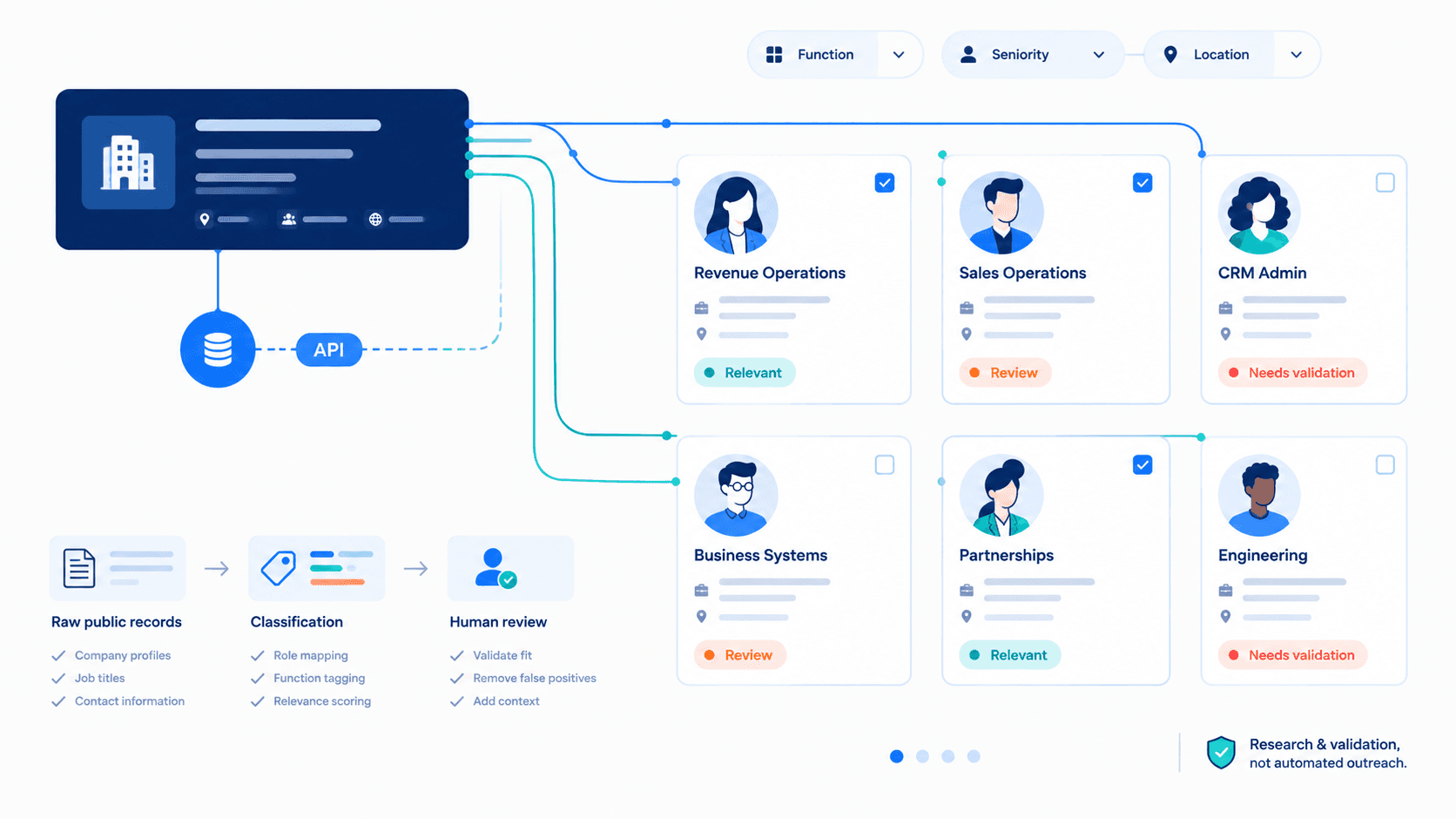
A Company Employees API helps you turn a selected company into a structured account map: retrieve available public professional records, group employees by likely function and seniority, and identify potential stakeholders for review. Use it after resolving the target company and deciding that the account deserves deeper research.
The output is not a verified organization chart or a list of confirmed decision-makers. It is a research workflow that helps sales, RevOps, recruiting, and partnership teams prioritize relevant contacts, record role-based hypotheses, and validate important details before taking action.
What Is a Company Employees API?
A Company Employees API returns available public professional records associated with a given company. Teams can use the response to retrieve data such as employee names, public profile references, current job titles, visible company associations, and selected career context when available.
For B2B account research, an employee API helps teams pull data from a selected account and convert it into structured data for a CRM, database, internal tool, or sales-intelligence workflow. The goal is not to create a bulk contact list. The goal is to organize potential stakeholders around a specific research use case.
A Company Employees API differs from an internal HR employee API. An HR API commonly supports creating, updating, deleting, and synchronizing employee records across HRIS, payroll, onboarding, and employee-management systems. A public professional-data API supports research into available public data associated with a company. It does not replace an HRIS, confirm employment status, expose private employee records, or provide unrestricted access to sensitive information.
| Term | Meaning | What it does not confirm |
|---|---|---|
| Employee list | Available public professional records associated with a selected company | A complete or verified organization chart |
| Account map | A structured view of teams and contacts relevant to a research use case | Reporting structure, ownership, or purchase authority |
| Relevant stakeholder | A contact that may be useful to research further | A confirmed buyer or decision-maker |
| Decision-maker | A person with authority over a specific decision | Something that can be inferred reliably from title alone |
| Employee data | Publicly available professional context, such as job titles and visible career information | Private HR data, compensation, performance, or personal records |
| Primary data source | The source record used to support a research classification | A guarantee that the record is complete, current, or verified |
Key takeaway: Employee data helps teams create research hypotheses. It should not be used as independent proof of authority, intent, reporting structure, budget ownership, or organizational responsibility.
When to Build an Account Map
Build an account map after your team has selected a company and has a defined business reason to research the people inside it. This timing keeps the workflow focused and prevents teams from collecting employee data without an operational purpose.
An account is ready for employee mapping when:
- The company has been resolved through a validated domain, company URL, universal name, slug, or supported company ID.
- The account matches the ICP, is assigned for account review, or appears in a research-priority queue.
- The team has a defined use case: sales account research, RevOps research, recruiting operations, partnership research, or workforce analysis.
- A CRM, data warehouse, internal tool, or database exists to store the account-map output.
- A named owner can review high-priority records and validate important research assumptions.
- The team has defined which functions, locations, job titles, and company-size ranges are relevant.
For example, a SaaS team selling a CRM data-quality product can focus on Sales Operations, Revenue Operations, Business Systems, and CRM Administration. A team selling engineering tools can instead research software developers, software engineers, platform leaders, DevOps teams, and security functions.
The Workflow in Context
| Workflow stage | Main question | Output |
|---|---|---|
| Company discovery | Which companies may match the target criteria? | Candidate account list |
| Company resolution | Is this the correct organization? | Resolved company record |
| Account prioritization | Which accounts deserve research first? | Research-priority queue |
| Employee account mapping | Which teams and contacts should be reviewed inside this account? | Account map and stakeholder research queue |
| Validation | What can be confirmed before action? | Reviewed research context |
Hiring activity can explain why an account deserves attention. Employee data helps teams understand who and which functions may be relevant inside that account.
Workflow: Company to Employee Account Map
A reliable company-to-employee workflow has 6 steps: resolve the company, retrieve employee records, handle pagination, classify records, save auditable research data, and validate before activation.
1. Start With a Resolved Company Record
Start with a stable identifier that your team has already validated. Do not use an ambiguous company name as the only input, especially for organizations with subsidiaries, regional entities, or similar brand names.
A canonical company record can include:
- Company domain
- Full company URL
- Universal name or slug
- Supported company ID
- Company name
- Company size, when relevant to segmentation
- Primary business location, when relevant to the use case
Use one canonical company identifier throughout the workflow. This improves refresh logic, debugging, CRM matching, duplicate prevention, and data reliability.
For example, an internal account record can store company_id, company_slug, company_domain, and company_name. Your application can query the employee listing endpoint with the supported identifier while preserving the remaining company data for research, matching, and audit purposes.
2. Retrieve the Company Employee List
Retrieve employee records for the current research scope, not for indiscriminate data collection. If a company has 1,000 visible employee records but the active use case concerns RevOps, the first step is to identify titles and functions relevant to Revenue Operations, Sales Operations, Business Systems, and CRM workflows.
EnvoAPI provides a company employee listing endpoint based on a company universal name, with optional controls for pagination and profile-detail inclusion. Review the API reference before you implement a request so your code uses the documented endpoint, parameters, response fields, and status codes.
Apply 4 operating rules:
- Retrieve only the records needed for the active research workflow.
- Keep raw response data separate from normalized account-map fields.
- Enrich selected individual employees only when there is a clear research reason.
- Store the response timestamp and request context with the research record.
A simple Python integration can call the endpoint through a server-side service, parse the API response, apply title filters, and write selected records into a review queue. Do not expose credentials in browser-side code, notebooks shared outside the team, or public repositories.
A typical workflow looks like this:
1. Query a resolved company identifier.2. Retrieve the first employee-list page.3. Read the response and pagination fields.4. Filter records by relevant job titles or location.5. Create account-map records for selected employees.6. Assign human review before CRM activation or outreach preparation.Important: The employee list is a primary data source for the initial research process. It should remain linked to the raw response or public profile reference so your team can review the context behind each classification.
3. Handle Pagination and Data Freshness
Employee lists can contain multiple pages, especially for companies with hundreds or thousands of visible records. Do not assume that the immediate page or first response represents every employee associated with the company.
Follow the documented pagination model:
- Start from the first page, offset, or cursor defined in the API documentation.
- Check for fields such as hasMore, nextOffset, or cursor values when available.
- Set page and item limits for background jobs.
- Record the retrieval timestamp for every employee-list request.
- Refresh high-priority account maps on a defined cadence.
- Send incomplete, ambiguous, or outdated records to a research-review queue.
EnvoAPI list responses can use offset, nextOffset, hasMore, and cursor-based pagination. Use the pagination documentation as the source of truth for your implementation.
A practical background process can set a limit of 5 pages or 250 records per account run, then create a follow-up job when additional pages are required. This helps teams scale account research while controlling API usage, processing time, and pricing consumption.
New data should not overwrite validated internal data automatically. Keep source timestamps and review timestamps separate:
- source_timestamp shows when the API retrieved the public record.
- last_reviewed_at shows when a user evaluated the record.
- research_status shows whether the record is new, relevant, validated, or deprioritized.
Daily updates can be useful for high-priority workflows, but the right refresh cadence depends on account tier, research volume, API budget, and operational requirements. A Tier 1 account may receive weekly review, while lower-priority accounts can be refreshed every 30 or 90 days.
4. Classify Records Into Research Categories
Raw employee data becomes useful when teams classify records into consistent research categories. This creates structured data that different systems and teams can use without confusing hypothesis with fact.
Core classification fields include:
- Function hypothesis
- Seniority hypothesis
- Stakeholder segment
- Research status
- Research reason
- Location, when relevant
- Human-review requirement
- Source confidence or data-quality note
When a response does not explicitly provide a field such as department, seniority, employment status, or reporting relationship, title-based classification remains a hypothesis rather than a verified fact.
For example, “Head of Revenue Operations” can receive:
- Function hypothesis: Revenue Operations
- Seniority hypothesis: Functional leader
- Stakeholder segment: Potential stakeholder
- Research status: Needs validation
- Research reason: RevOps workflow research
- Human-review requirement: Yes
The same classification model can support different use cases. For a technical product, “Software Engineer,” “Senior Software Developer,” “Platform Engineer,” and “DevOps Engineer” may indicate technical workflow relevance. For a recruiting product, “Talent Acquisition Partner,” “Recruiting Operations Manager,” and “People Operations Director” may indicate recruiting or people-process relevance.
Note: When a classification comes from a title rather than an explicit API field, record it as a hypothesis—not as a verified employee fact.
5. Save an Auditable Research Record
A useful account map stores both employee data and the context that explains why a record appears in the workflow. This preserves a single source of truth for research status across your CRM, database, and internal tools.
Save the following information:
- Source timestamp
- Research status
- Research reason
- Assigned owner or reviewer
- Last reviewed date
- Raw-data reference or profile URL
- Current title used for classification
- Company identifier used for retrieval
- Classification rule version, when your system uses automated rules
This structure reduces manual data entry across multiple platforms. It also helps teams avoid creating duplicate records, repeating the same research, or losing context when an account moves between sales, RevOps, recruiting, and partnership teams.
A company employee API can connect research systems by creating a repeatable data flow: API response to account map, account map to human review, and validated research context to the appropriate CRM or internal application. That workflow is more reliable than copying names and titles manually into disconnected spreadsheets.
6. Validate Before Activation
An employee account map is not an automated outreach list. Validate high-impact records before using them in sales, recruiting, partnership, or customer workflows.
Validation can include:
- Reviewing the current title and available public profile context.
- Comparing the role hypothesis with the company website and company description.
- Checking whether the employee’s function matches the active research use case.
- Confirming account ownership and existing CRM records.
- Checking location or regional scope when it affects relevance.
- Confirming that approved internal data is not overwritten by a new API response.
- Reviewing the record before using it in outreach preparation.
Caution: A public profile may indicate likely functional context. It does not independently verify reporting lines, purchase involvement, budget authority, employment status, or current team responsibility.
Ready to test a company-to-employee research workflow in your own application?
Get API key · Explore the docs
100 free credits · No credit card required
How to Classify Relevant Employees
A useful account map organizes employee records through 3 dimensions: function, seniority, and title keywords. This framework helps teams identify relevant research paths without claiming that a title confirms authority.
Classify by Function
| Function group | Example title signals | Typical research use |
|---|---|---|
| Revenue operations | Revenue Operations, Sales Operations, CRM, Business Systems | Revenue-process, CRM, reporting, and data-workflow research |
| Sales and GTM | Sales Development, Account Executive, Enablement, Customer Success | GTM structure and customer-facing workflow research |
| Recruiting and people | Recruiter, Talent Acquisition, Recruiting Operations, People Operations | Talent, recruitment, onboarding, and hiring-workflow research |
| Partnerships | Partnerships, Alliances, Ecosystem, Channel | Partner motion and ecosystem research |
| Product and engineering | Product, Software Engineer, Software Developer, Platform, Data, DevOps, Security | Product, developer-tools, and technical-context research |
| Finance and business operations | Finance, Procurement, Operations, Strategy | Business-process and operational-context research |
Note: Job titles vary by company, market, location, and seniority model. A broad title such as “Operations,” “Growth,” “Engineer,” or “Strategy” needs manual review before assignment to a function group.
Classify by Seniority
| Seniority hypothesis | Typical title cues | Research interpretation |
|---|---|---|
| Executive context | Founder, CEO, COO, CRO, C-level | May provide business context; not automatically a buyer |
| Functional leader | VP, Head, Director | May be relevant to functional ownership; validate scope |
| Team manager | Manager, Lead | May understand workflows and operating priorities |
| Potential user | Specialist, Analyst, Administrator, Coordinator, Engineer | May have direct operational context |
| Unknown | Ambiguous, incomplete, or conflicting title | Send to manual review |
A CEO can provide public company context but is not automatically the relevant contact for a specific software workflow. A CRM Administrator, Sales Operations Manager, or software engineer may have more direct knowledge of the process your team is researching.
Classify by Title Keywords
Use a clear title-classification workflow before introducing complex scoring models:
1. Define the account research hypothesis.2. Match available job titles to relevant function keywords.3. Normalize equivalent title variations into one function group.4. Filter by location, seniority, or company context when needed.5. Prioritize likely functional leaders and operational users.6. Flag unclear or conflicting titles for human review.7. Do not label a contact as a decision-maker based on title alone.For a RevOps use case, a title rule can group “Sales Ops Manager,” “Revenue Operations Lead,” “CRM Administrator,” and “Business Systems Analyst” into a revenue-process research segment.
For an engineering-product use case, “Software Engineer,” “Senior Backend Engineer,” “Platform Engineer,” and “DevOps Lead” can enter a technical-context research queue. These labels indicate possible relevance to the use case, not confirmed ownership of a project, tool, budget, or purchasing decision.
Build an Account Map: Example
Consider a B2B SaaS team researching an account with potential relevance to a RevOps or sales-operations workflow. The team retrieves available employee records, classifies job titles, filters records into relevant segments, and creates a focused research queue.
| Stakeholder segment | Example title | Function hypothesis | Research status | Research purpose |
|---|---|---|---|---|
| Executive context | Chief Revenue Officer | Revenue leadership | Review | Understand public GTM context and strategic direction |
| Functional leader | Head of Revenue Operations | Revenue Operations | Relevant | Review potential ownership of a RevOps workflow |
| Potential user/champion | Sales Operations Manager | Sales Operations | Relevant | Understand day-to-day process and system context |
| Potential user/champion | CRM Administrator | Sales Operations / Business Systems | Needs validation | Review potential CRM workflow relevance |
| Non-relevant for this use case | Senior Backend Engineer | Engineering | Deprioritized | Keep outside the initial RevOps research scope |
These labels are research classifications, not verified employment facts beyond the available source record. A functional leader may not own a budget, while an operational user may provide the most useful context about a workflow. Validate high-impact assumptions before taking action.
What Employee Data Should an Account Map Store?
A structured schema lets sales, RevOps, recruiting, and partnership teams work from the same research record without mixing raw data, public data, and validated internal information.
| Field | Purpose |
|---|---|
| company_id or company_slug | Links the employee record to the resolved account |
| company_domain | Supports CRM matching and deduplication |
| company_name | Provides a readable account reference |
| company_size | Supports account segmentation when relevant |
| profile_url | Provides a reviewable profile reference |
| public_identifier | Supports record matching and selected-profile enrichment |
| full_name | Creates a human-readable research record |
| current_title | Provides input for role classification |
| location | Supports region-specific research when relevant |
| function_hypothesis | Documents likely functional relevance |
| seniority_hypothesis | Documents level classification |
| stakeholder_segment | Groups the record in the account map |
| research_status | Tracks New, Reviewed, Relevant, Needs validation, or Deprioritized |
| research_reason | Preserves why the contact was included |
| source_timestamp | Shows when the public source record was retrieved |
| last_reviewed_at | Separates source retrieval from human validation |
| assigned_owner | Identifies the person responsible for review |
| raw_data_reference | Preserves a link or reference to the original API response |
Implementation note: Keep raw API data and normalized CRM fields separate. This makes it easier to review source context, update classification rules, prevent accidental overwrites, and maintain a consistent account-research process.
Use Cases for Employee Account Mapping
Sales and RevOps Research
Review Sales, Revenue Operations, Business Systems, CRM, Enablement, and customer-facing functions. The account map helps teams identify probable functional leaders and potential operational users before any outreach decision.
Use employee data to build a research queue, not an automated contact export. A structured workflow reduces manual account research and gives account executives, sales operations teams, and researchers a shared view of who requires validation.
Recruiting Research
Review Talent Acquisition, Recruiting Operations, People Operations, and employee-onboarding functions. Public employee data can help teams understand visible team context and identify records relevant to talent sourcing or workforce analysis.
Do not assume that a recruiter, HR manager, or people-operations title confirms ownership of a specific open role or onboarding process. Validate hiring context through approved sources before engagement.
Partnership Research
Review Partnerships, Alliances, Ecosystem, Channel, and business-development roles. These records can support a research hypothesis about a company’s partnership motion or visible team structure.
Validate product scope, geographic responsibility, customer segment, and current business priorities before action. A partnership title alone does not confirm that a specific partnership opportunity exists.
Product and Engineering Research
Review software engineers, software developers, platform teams, data teams, security teams, and technical leaders when the use case involves developer tools, infrastructure, engineering workflows, or technical integrations.
A technical title may indicate relevant system context, but it does not confirm technology adoption, internal architecture, tool ownership, or procurement responsibility. Use the account map to prioritize research, then validate the technical context through public company materials and approved internal records.
Implementation Practices
Use the following practices to build a secure, reliable, and scalable employee-research workflow:
- Use a stable company identifier for retrieval and refresh workflows.
- Follow documented pagination instead of assuming one employee-list response is complete.
- Apply bounded page and item limits for background jobs.
- Filter employee records by research purpose, job titles, location, and account context.
- Validate fields before writing records into a CRM, warehouse, or internal application.
- Store retrieval timestamps with employee and account-map records.
- Deduplicate records with documented identifiers where available.
- Preserve raw API responses separately from normalized research fields.
- Keep API keys in server-side environment variables or a secrets manager.
- Do not expose API keys in browser-side code.
- Check HTTP status codes, error responses, and rate-limit guidance in your integration.
- Review high-priority records before using them in sales, recruiting, or partnership workflows.
- Define user roles and authorization controls for systems that store sensitive internal account notes.
API authentication and authorization control access to your account-map system and protect API credentials. EnvoAPI uses X-API-Key authentication and recommends routing browser-facing application requests through a server-side endpoint rather than exposing an API key in client-side code. Follow the documented API authentication guidance when you implement your integration.
Webhooks and event notifications can support internal workflow automation when your systems need to notify a user about a reviewed record, a changed research status, or a completed enrichment job. Do not assume that a public employee-data endpoint provides real-time employment-change notifications unless the documented API explicitly supports that capability.
Common Mistakes When Building an Account Map
Avoid these 10 mistakes:
- Treating every employee record as a contact for sales outreach.
- Treating a public job title as proof of buying authority or budget ownership.
- Assuming the employee list is a complete company organization chart.
- Ignoring pagination and reviewing only the first response page.
- Adding every employee record to a CRM without purpose, ownership, or status.
- Treating a missing employee record as proof that a team does not exist.
- Failing to store source timestamps and review dates.
- Recording title-based classifications as confirmed facts.
- Mixing employee research workflows with automated outreach workflows.
- Treating a public professional-data API as an official API, an HRIS system, or a source of private employee information.
Key principle: A reliable workflow separates research data, validated internal data, and activation steps. That separation reduces errors and gives teams a clearer record of what was retrieved, what was inferred, and what was confirmed.
Frequently Asked Questions
What is a Company Employees API?
A Company Employees API returns available public professional records associated with a company. Teams use it to retrieve employee data, review job titles, group records by relevant functions, and build account maps for research workflows.
How can employee data support account mapping?
Employee data can help teams group potential stakeholders by title, function hypothesis, seniority hypothesis, location, and research status. It supports structured account research after a company has already been selected.
Can employee data identify decision-makers?
Not reliably on its own. A title or profile may indicate that a contact is worth researching, but it does not confirm final authority, budget ownership, reporting structure, purchase involvement, or employment status.
What should an account map include?
At minimum, store a company identifier, profile reference, full name, current job title, function hypothesis, seniority hypothesis, stakeholder segment, research status, research reason, source timestamp, review date, and assigned owner.
Should every employee record be added to a CRM?
No. Add records only when they serve a defined business purpose, such as selected-profile enrichment, account research, recruiting research, routing, technical research, or a validated sales workflow.
Can a Company Employees API replace an HR employee API?
No. An HR employee API supports internal employee-record management across systems such as HRIS, payroll, onboarding, and benefits platforms. A Company Employees API supports research using available public professional records associated with a company.
How often should employee account maps be refreshed?
Use a refresh cadence that matches account importance and workflow needs. Store retrieval timestamps, review high-priority accounts more frequently, and validate important records before relying on them. A weekly cadence can suit Tier 1 accounts, while 30-day or 90-day refresh cycles can suit lower-priority research queues.
Does employee data provide real-time updates?
Use only the update behavior documented by the API provider. A retrieved record reflects available data at the time of the request, so teams should save source timestamps and refresh important accounts rather than treating a single response as permanent data.
Build a More Structured Account-Research Workflow
A company employee list becomes more useful when it supports a repeatable process: resolve the account, retrieve available public professional records, classify relevant contacts, record research hypotheses, and validate important information before activation.
Use employee data to improve research quality, not to make unsupported assumptions. A structured account map helps teams connect company data, employee data, review status, and workflow ownership in one reliable process.
Ready to build your account-research workflow?
Get API key · Explore the docs
100 free credits · No credit card required