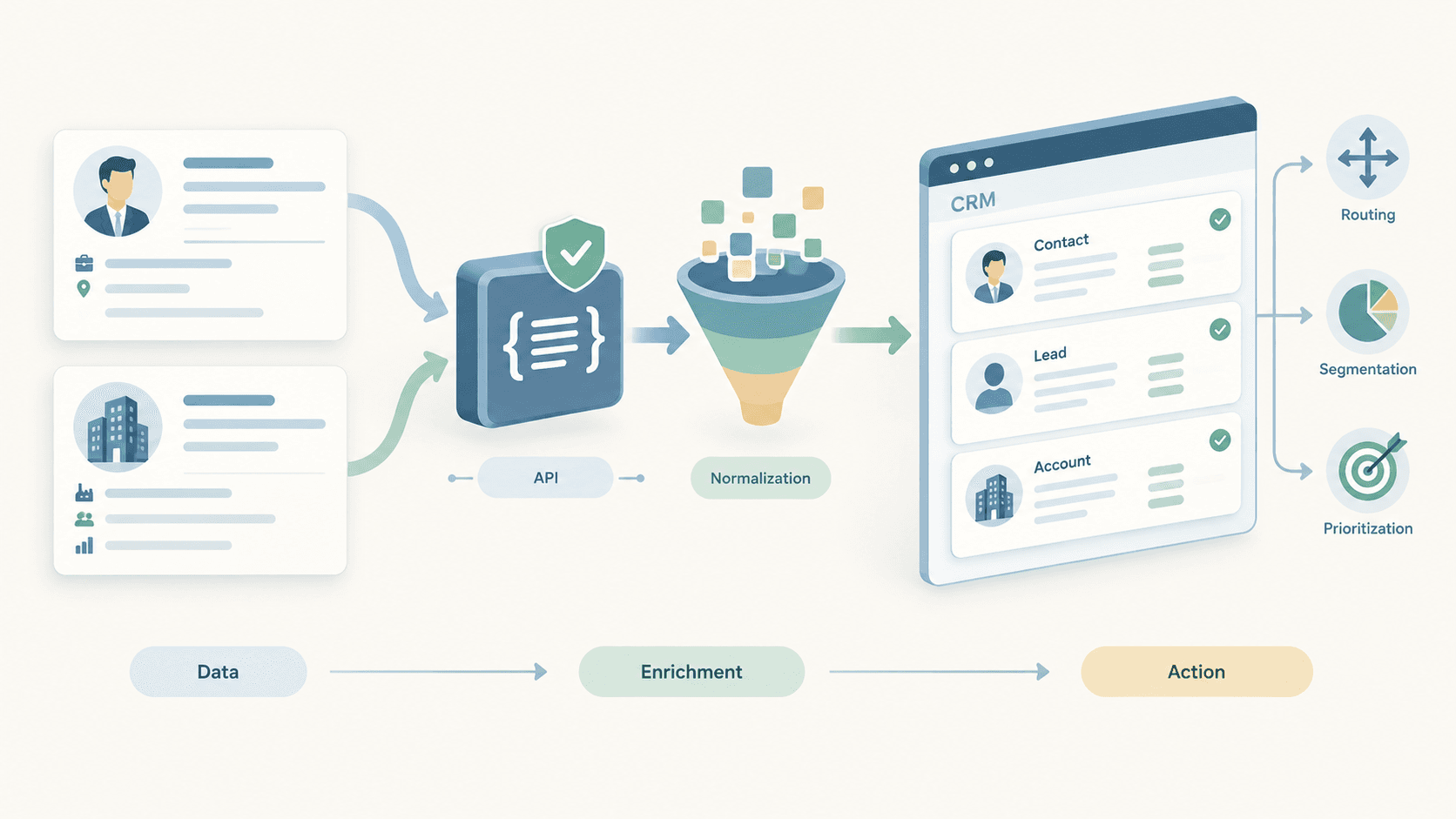
CRM records lose value when professional and company context becomes incomplete or outdated. Structured public professional and company data can help GTM teams enrich Contact, Lead, and Account records for qualification, routing, segmentation, account research, and prioritization.
The goal is not to add more CRM fields. The goal is to turn validated external context into a controlled GTM action.
Public professional and company data↓CRM enrichment↓GTM actionEnvoAPI provides structured public profile, company, search, job, and post data that developers can use in CRM enrichment and GTM workflows.
EnvoAPI is an independent, unofficial third-party API and is not affiliated with or endorsed by LinkedIn.
How a CRM Enrichment Workflow Works
A CRM enrichment workflow retrieves structured public data, validates the match against an existing CRM record, applies controlled field updates, and uses the enriched context to support a GTM decision.
CRM record or reliable identifier↓Retrieve structured public data↓Validate the person or company match↓Normalize and map fields↓Apply fill, update, preserve, or review rules↓Trigger or inform a GTM actionA workflow can start with a Contact, Lead, or Account already in the CRM. Use stable identifiers whenever possible:
| CRM object | Preferred identifier | Supporting context | Avoid relying on |
|---|---|---|---|
| Contact or Lead | Public profile URL or public identifier | Name, company, business email | Name only |
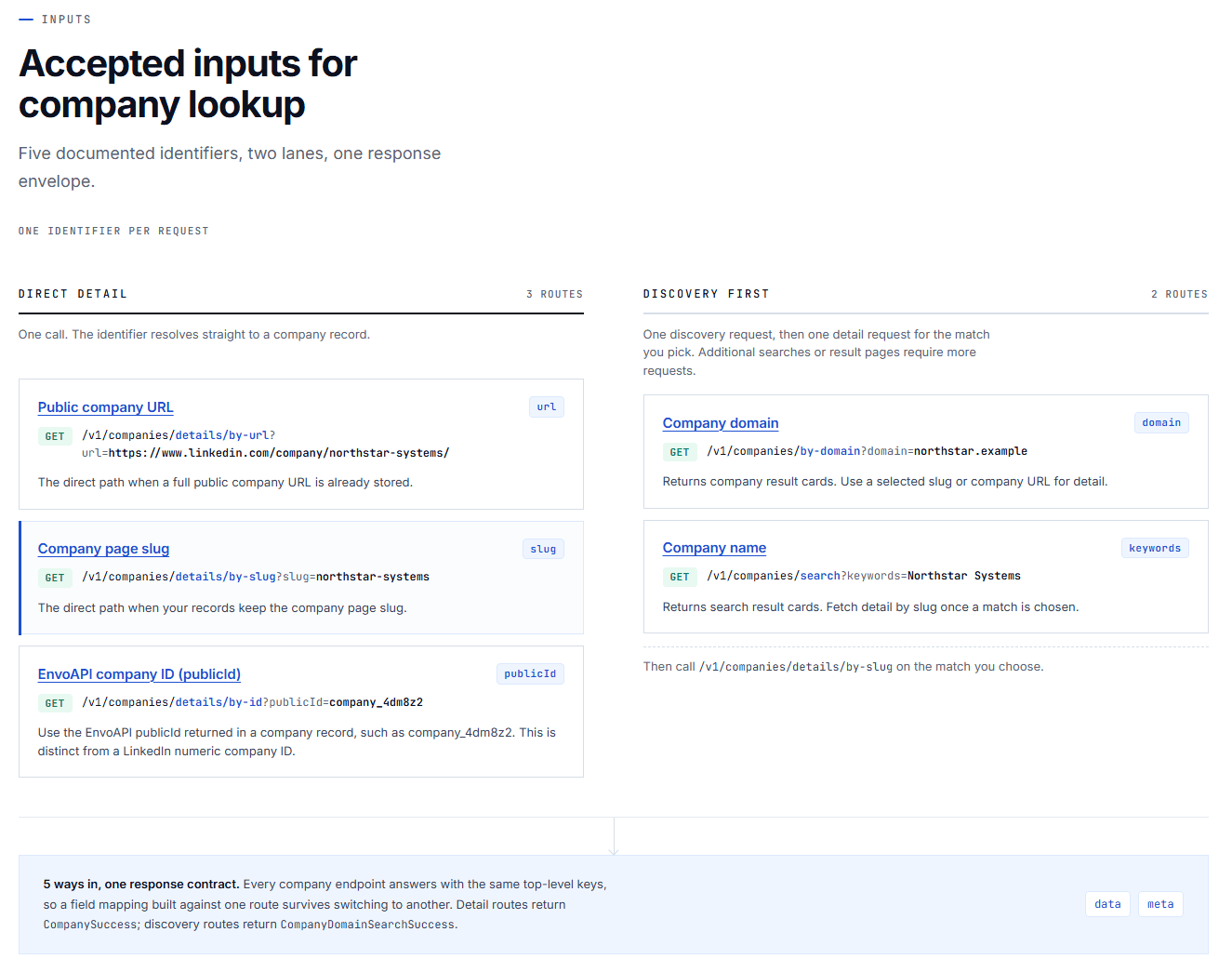
| Account | Company domain or company URL | Company name, location, website | Similar company names |
| Contact-to-Account association | Current company plus normalized domain | Existing Account name and website | Text-only company matching |
Identity resolution determines whether an external result refers to the same person or company as an existing CRM record. It is essential for reducing matching errors, preventing duplicate records, and making recurring enrichment reliable.
Structured API responses make this process repeatable. An application can retrieve data, normalize values, evaluate match confidence, map fields to a CRM schema, and trigger only the workflows that meet defined rules.
API credentials should be used server-side. Do not expose API keys in browser code, public spreadsheets, client-side applications, or any environment where they can be copied or reused.
Data for CRM and GTM Workflows
Professional data for Contacts and Leads
Professional data adds person-level context to CRM records. Relevant fields can include:
- Current role and job title
- Current company
- Professional headline
- Location
- Employment history
- Functional area and seniority
- Profile URL
- Public identifier
Teams can use public profile data for CRM enrichment to complete Contact and Lead records, classify personas, associate people with the correct Account, and reduce manual research before a call or account-planning session.
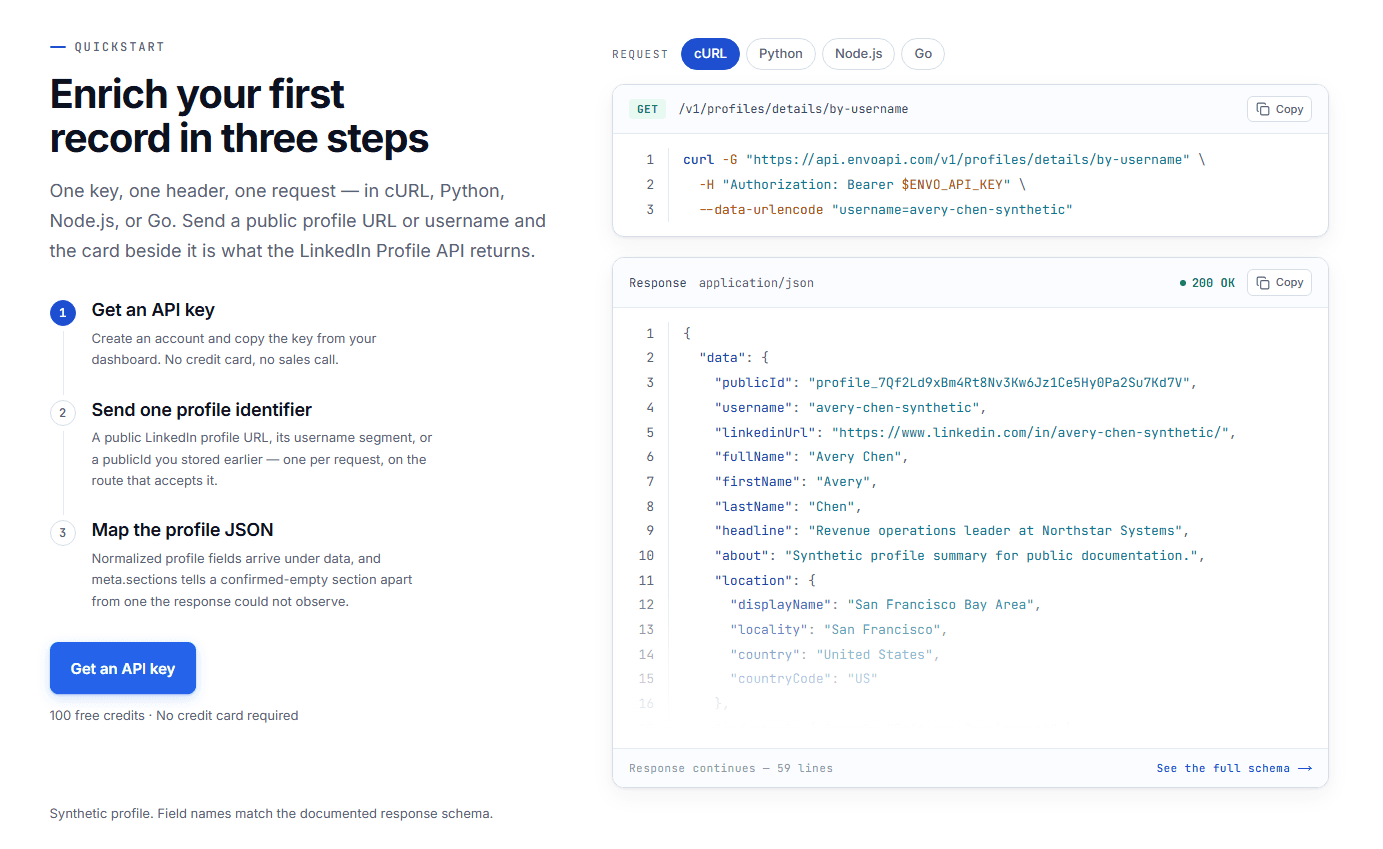
For example, a CRM Contact with only a name and business email becomes more useful after enrichment adds a current title, employer, location, and stable profile URL. That context can support persona classification, Account association, territory context, and sales research.
Company data for Accounts
Company data adds firmographic context to CRM Accounts. Common fields include:
- Company domain
- Website
- Industry
- Employee count
- Company-size range
- Headquarters location
- Company description
- Company profile identifier
Use company data for account enrichment to complete Account records, support ICP qualification, improve segmentation, plan territories, and prioritize account research.
A company domain is especially valuable because it provides a stable starting point for account matching and enrichment. A domain-based workflow can map returned data to Account Domain, Industry, Company Size, Website, and Region fields.
Keep raw employee count separate from a normalized CRM size band. For example:
Raw source field: Employee count = 450Derived CRM field: Company size = 201–500Derived GTM field: ICP tier = EnterpriseThis separation makes it easier to revise ICP logic without overwriting source context.
Jobs, search, and public activity
Jobs, people search, company search, and public posts can add account-research context. Jobs may reveal hiring patterns or team structure. Search can help identify relevant people and companies. Public activity can give representatives useful planning context.
| Data type | What it describes | CRM and GTM use |
|---|---|---|
| Contact data | A professional’s role, company, location, and profile context | Persona classification, account association, research |
| Firmographic data | A company’s industry, size, location, website, and business context | ICP scoring, segmentation, territory planning |
| Technographic data | Software tools and technology infrastructure used by a company | Product-fit research when supported by the source |
| Intent signals | Signals that an Account may be researching a category or topic | Research prioritization, not automatic purchase-intent classification |
| Public jobs and posts | Public hiring and activity context | Account research prompts and planning context |
Public jobs, company posts, and professional activity can help teams research an Account. They do not, by themselves, confirm budget, buying authority, purchase intent, or an active buying process.
Apply Controlled CRM Update Rules
Before writing external data into a CRM, normalize formats and confirm that the returned entity matches the intended Contact, Lead, or Account.
Common normalization steps include:
- Convert domains to a consistent lowercase root domain.
- Standardize locations into approved country, region, or territory labels.
- Map title variations such as “VP RevOps,” “Vice President, Revenue Operations,” and “VP of Revenue Operations” into a consistent persona taxonomy.
- Separate raw source fields from derived CRM fields such as persona, lead score, or ICP tier.
- Check whether the same external identifier already exists on another CRM record.
Map every enrichment field to a CRM destination and update rule.
| External context | CRM destination | Suggested update rule | GTM use |
|---|---|---|---|
| Current title | Job Title | Fill empty field; flag material seniority changes | Persona classification |
| Current company | Account association | Match with normalized company domain where possible | Lead-to-Account matching |
| Profile URL | Profile URL or External ID | Save once validated; preserve for future refreshes | Identity resolution |
| Company domain | Account Domain | Fill if missing; review conflicts | Account matching |
| Industry | Industry | Fill or refresh when CRM value is stale | Segmentation |
| Employee count | Company Size | Update under a defined freshness rule | ICP scoring |
| Location | Region or Territory | Normalize before applying routing rules | Territory routing |
| Company description | Account research notes | Store as source context, not a decision field | Account planning |
A reliable workflow does not automatically replace every existing value.
| CRM field state | Workflow behavior |
|---|---|
| Field is empty | Fill from validated external data |
| Existing CRM value is stale | Update when identifier matching is reliable |
| Existing value is verified internally | Preserve it; store external context separately if needed |
| External result conflicts materially | Flag the record for review |
| No confident match | Do not create or overwrite a record automatically |
Never allow external enrichment to overwrite internal CRM decisions such as Account Owner, lifecycle stage, opportunity stage, opportunity amount, customer status, consent status, or account strategy.
Useful metadata includes:
last_enriched_atenrichment_statussource_identifiersource_typefield_last_updated_atreview_requiredmatch_methodThis metadata helps teams audit data quality, monitor freshness, identify low-confidence matches, and distinguish enrichment context from internally verified CRM data.
Data-quality guardrail
Public professional and company data is useful context, not absolute certainty. Public records can be incomplete, outdated, or inconsistent with verified internal CRM data.
Validate identifiers, preserve internal decisions, record data freshness, and send material conflicts through a review workflow. A missing public field does not necessarily mean the CRM record is wrong; the source may not expose the information or the identifier may not resolve fully.
Five CRM and GTM Workflows
1. Enrich CRM contacts with professional context
CRM Contact↓Profile URL or identifier↓Professional data↓CRM update↓Sales contextContact enrichment can add current title, employer, location, professional context, and a stable profile URL to incomplete records. This supports persona identification, pre-call preparation, qualification, and cleaner Contact-to-Account relationships.
For example, a Contact can be classified into a revenue operations persona after a validated current title maps to your title taxonomy.
Use an exact profile URL or public identifier where possible. Route material employer changes or major seniority changes to review instead of silently replacing verified CRM values.
2. Enrich CRM Accounts with company context
Company domain↓Company data↓CRM Account↓ICP and segmentation contextAccount enrichment adds structured firmographic context such as industry, employee count, company-size range, website, location, and company description. Teams can use these fields for ICP scoring, segmentation, territory planning, and account prioritization.
For example, a workflow can classify an Account as an enterprise target when its validated industry, employee range, and region meet documented ICP criteria.
Company data should support Account decisions, not replace internal strategy. Preserve Account Owner, named-account status, customer relationship status, opportunity stage, and other internal decision fields.
3. Qualify and route new Leads
New Lead↓Professional and company enrichment↓Qualification criteria↓Lead routingLead enrichment connects person-level and company-level context to routing logic.
Relevant role+ Target company size+ Target industry+ Supported region= Qualified Lead for the appropriate GTM queueFor example, a Lead can enter an enterprise sales queue when enrichment confirms a Director-level role at a company with at least 500 employees in a supported industry and territory. The workflow can assign a persona, calculate a score, associate the Lead with an Account, and route it to the relevant team.
Do not route automatically when identity, location, Account association, or company matching is ambiguous.
4. Research and prioritize target Accounts
Target Account↓Company data + professional context + jobs or public activity↓Account research↓PrioritizationTarget-account research starts with validated company context, then expands to relevant people, hiring context, and public activity before account planning.
Useful questions include:
- Does the company fit the target industry, size, and region?
- Which functions and seniority levels are relevant to the sales process?
- Is the Account record complete enough for outreach or account planning?
Jobs and posts are useful research inputs. Treat them as public context that can prompt a research task, not as confirmed buying intent.
5. Refresh CRM records as data changes
Existing CRM records↓Re-enrichment↓Compare current and returned data↓Apply update or review rulePeople change companies, titles evolve, and company records change. Periodic enrichment helps maintain accurate qualification, routing, and account-planning context.
Prioritize refreshes according to business value:
| Record segment | Suggested enrichment approach |
|---|---|
| Open opportunities | Refresh before key sales stages or account reviews |
| Active outbound prospects | Refresh before outreach sequences or territory assignment |
| High-priority Accounts | Refresh on a scheduled cadence and after significant activity |
| Recently created Leads | Enrich at creation when a reliable identifier is available |
| Old inactive records | Enrich only when reactivated or needed for a campaign |
Start with records that influence active pipeline, current outbound activity, or high-priority account plans. Avoid enriching every CRM record without a matching and refresh strategy.
Build CRM Enrichment Workflows With EnvoAPI
Profile URL or company domain↓EnvoAPI↓Structured public profile or company data↓Your CRM or GTM workflowEnvoAPI provides structured public profile, company, people search, company search, jobs, and posts data through a developer-friendly API.
- Use the Profile API to enrich Contact and Lead records with professional context.
- Use the Company API to enrich Accounts with firmographic context.
- Use Search APIs to discover or validate people and companies before enrichment.
- Use Jobs and Posts APIs as public research context for account planning.
A practical implementation follows this pattern:
- Start with an existing CRM Contact, Lead, or Account.
- Validate a profile URL, public identifier, company domain, or company URL.
- Retrieve structured professional or company data through EnvoAPI.
- Confirm that the returned entity matches the CRM record.
- Map only fields that support a defined GTM decision.
- Apply fill, update, preserve, or review rules.
- Save the source identifier, enrichment timestamp, match method, and review status.
- Trigger routing, segmentation, scoring, or research tasks only after the relevant rules are met.
- Refresh active and high-value records periodically.
Build your first CRM enrichment workflow with structured public professional and company data. Explore the developer documentation, try EnvoAPI in the Playground, or start with 100 free credits.
Frequently Asked Questions
What is CRM data enrichment?
CRM data enrichment is the process of adding, validating, updating, or structuring external context inside CRM records. It helps GTM teams improve Contact, Lead, and Account data for qualification, routing, segmentation, account research, and prioritization. A reliable workflow uses stable identifiers, controlled field mapping, freshness tracking, and review rules for meaningful conflicts.
What is contact data enrichment?
Contact data enrichment adds professional context to an individual CRM record. Typical fields include current title, company, location, employment context, profile URL, and a public identifier. This information can support persona classification, Account association, sales research, territory context, and CRM data quality. Preserve internally verified data and review material discrepancies before applying high-impact updates.
What is account enrichment?
Account enrichment adds company context to a CRM Account record. Common fields include company domain, website, industry, employee count, company-size range, location, and company description. Teams use account enrichment for ICP scoring, segmentation, territory planning, account prioritization, and data-quality improvement. It should not overwrite internal decisions such as Account Owner, customer status, opportunity stage, or account strategy.
Is EnvoAPI affiliated with LinkedIn?
No. EnvoAPI is an independent, unofficial third-party API and is not affiliated with or endorsed by LinkedIn. It should not be described as an official LinkedIn CRM integration.
CRM enrichment works when it turns validated public professional and company context into a specific GTM action. Start with a stable identifier, map only decision-relevant fields, apply controlled update rules, and preserve the distinction between external context and internal business decisions.