LinkedIn Profile Data Freshness: How to Detect and Refresh Stale CRM Records
Updated October 5, 202619 min read EnvoAPI team
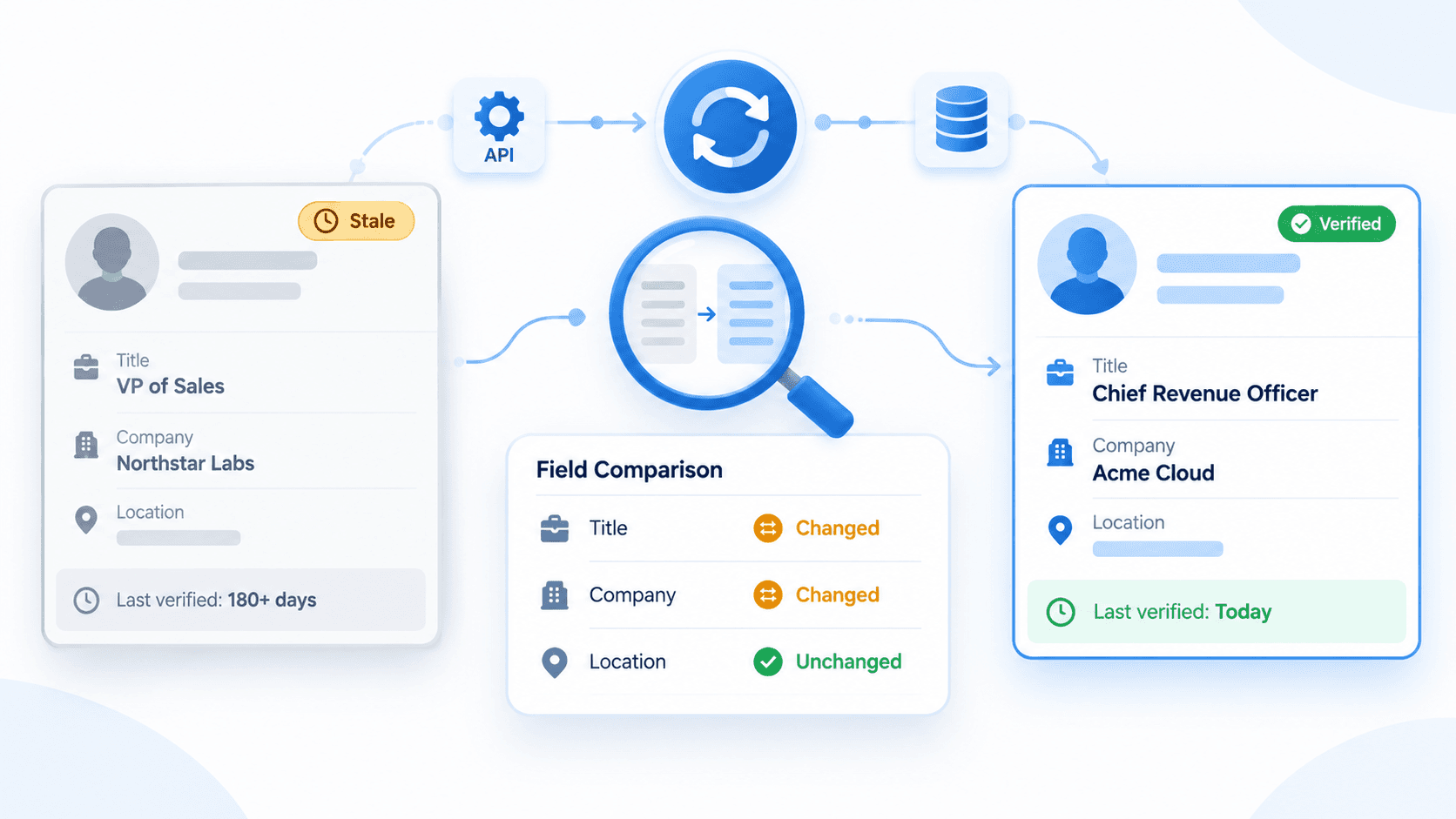
CRM profile records become stale when a person’s real-world professional context changes while the CRM continues to rely on an older snapshot. A contact may move to a different company, take on a new title, change seniority, or relocate, while sales routing, account coverage, segmentation, and outreach still use values that were correct months ago.
The solution is not to enrich a record once and assume it remains current. A reliable process identifies records worth re-checking, retrieves available structured professional profile context, compares relevant fields, applies controlled update rules, and records when the data was last verified.
Quick answer: Treat freshness as a field-level process. Prioritize high-change fields, especially current company, job title, seniority, and location. Refresh records based on verification age, business importance, and the effect outdated data can have on a decision.
What Is LinkedIn Profile Data Freshness?
LinkedIn profile data freshness is the degree to which information stored in a CRM still reflects a person’s current professional situation. It is not simply whether a record contains values. It is whether the values that matter to a workflow have been checked recently enough to remain useful.
A LinkedIn profile can contain professional information such as a headline, current role, experience, location, skills, education, and other profile attributes. The visibility of public profile information can vary according to a member’s settings and the availability of profile data.
A CRM record can be complete and still be stale. For example, a contact’s name and profile identifier may remain correct while their current employer and title no longer match the role they hold today. For this reason, profile freshness should be evaluated at the field level rather than by labeling an entire record as current or outdated.
| Concept | Meaning | Example |
|---|---|---|
| Accuracy | Whether a value was correct when it was collected or verified | “VP of Sales at Company A” was correct during the previous enrichment |
| Completeness | Whether a CRM field contains a usable value | The record includes a title, company, and location |
| Freshness | Whether the stored value still reflects the current professional context | The person is now a CRO at Company B, while the CRM still stores VP of Sales at Company A |
Accurate data can become stale over time. A complete CRM record can also be stale when professional context has changed and the stored fields have not been re-checked.
What Makes CRM Profile Records Stale?
Profile records do not become stale only because they are old. They become stale when change-prone professional attributes change in the real world but the CRM does not verify or update the corresponding fields.
Stale CRM data is one form of poor data quality. A contact record can have a company, title, location, and profile URL while no longer reflecting the person’s current professional context. Over time, stale records can affect account association, lead routing, account ownership, segmentation, outreach research, and pipeline review.
Job and Company Changes
A person may leave an employer, join a new company, move internally, or take a role that changes how they relate to an account. If a CRM still associates that contact with a former employer, account coverage and ownership decisions can become inaccurate.
Current company is usually a high-priority freshness field because it can affect:
- Account association
- Opportunity context
- Territory planning
- Sales outreach relevance
- Account ownership
- Persona segmentation
- Account records inside the CRM
A company change should not automatically remove historical context. The CRM should preserve prior company information when it matters for prior opportunities, account history, reporting, or future re-engagement.
Title and Seniority Changes
Promotions, functional moves, and changes in responsibility can alter a contact’s title, seniority, and role in a buying or recruiting process. Those changes can affect persona segmentation, lead scoring, sales routing, account planning, and how a team prioritizes the record.
A title change does not always mean the contact is no longer relevant. It is a signal to re-evaluate the record against the workflow that uses it. A contact who moved from VP of Sales to Chief Revenue Officer may still be relevant to an active account, but their seniority, buying influence, and outreach context may require review.
Location and Profile Attribute Changes
Location can matter for territory assignment, regional coverage, market-specific outreach, event planning, and local account coverage. A person who relocates may need reassignment to a different territory owner or segment.
Headline and skills changes can add useful professional context for research and personalization. These fields are often less routing-critical than current employer or title, but they can indicate a change in focus, scope, function, or industry specialization.
This article focuses on professional profile freshness. It does not cover email verification, phone validation, deliverability, or other contact-data workflows.
Which Profile Fields Become Stale Fastest?
CRM freshness should be evaluated at the field level, not only at the record level. A CRM record may have a stable identity while its employment context is outdated.
| Profile field | Relative volatility | Why it can become stale | Refresh priority |
|---|---|---|---|
| Current company | High | Job changes, internal transfers, new employment | High |
| Current job title | High | Promotions, role changes, shifts in responsibility | High |
| Seniority or function | Medium-high | Career progression or a move to a new role | High when routing or scoring depends on it |
| Headline | Medium-high | A person updates how they describe their focus or scope | Medium |
| Location | Medium | Relocation, remote-work changes, market moves | Medium-high when territory rules depend on it |
| Skills | Medium | Career development and profile updates | Medium |
| Employment history | Medium | New roles are added while historical roles remain useful | Compare current role; preserve relevant history |
| Industry classification | Medium | A new role or employer can change professional or company context | Medium when segmentation depends on it |
| Education | Low | It typically changes less often after early career | Low |
| Profile URL or public identifier | Low | Identity data is generally more stable but may require validation if matching fails | Validate on no-match or identity conflict |
Relative volatility is an operational prioritization framework, not a statistical benchmark. Current company and title often deserve earlier re-checking than education or stable identity fields.
How to Detect Stale CRM Records
Do not mark an entire CRM record as stale only because it has existed for a long time. Use record age as a reason to re-check, then identify staleness from field-level differences between stored CRM values and newly retrieved professional profile context.
A record with an older verification date needs attention, but age does not prove that the stored information is wrong. Detection should combine verification timing, identity matching, field comparison, and validation rules.
Check the Last Verification or Enrichment Time
Track freshness separately from generic CRM activity.
- last_checked_at: The most recent time a system attempted to verify a record, even if no data changed
- last_enriched_at: The most recent successful enrichment or profile retrieval
- last_verified_at: The most recent point at which a field or record met your verification rules
- record_created_at: The age of the record, which does not prove whether the data is correct
- crm_last_modified_at: A generic modification time that may reflect ownership changes, activity logging, imports, workflows, or manual edits rather than profile verification
An older verification timestamp increases the reason to re-check a record. It does not prove that the record is inaccurate.
Keeping separate freshness timestamps prevents CRM data archaeology. Teams can identify which underlying records were actually re-checked instead of relying on generic modification dates that do not explain what changed.
Compare Stored Data With Current Profile Data
Use a field-level comparison after retrieving available professional profile context for a known identifier.
| CRM field | Stored CRM value | Retrieved profile value | Comparison result |
|---|---|---|---|
| Job title | VP of Sales | Chief Revenue Officer | Changed |
| Current company | Northstar Labs | Acme Cloud | Changed |
| Location | Austin, Texas | Austin, Texas | Unchanged |
Typical workflow flags can include:
- job_title_changed
- current_company_changed
- location_changed
- seniority_changed
- no_change_detected
- profile_not_resolved
- identity_conflict
- review_required
These should be treated as rules in the CRM or data pipeline, not as assumed output fields of a data provider.
Detect Changes at the Field Level
Avoid a single record_is_stale label when a more precise model is possible. For example, the same record may have an unchanged name and location but a changed current company and title.
name: unchangedcurrent_company: changedjob_title: changedseniority: review_requiredlocation: unchangededucation: not_recheckedField-level status makes it possible to update only fields that changed, preserve stable values, and send sensitive conflicts to a human review queue. For example, an employer change linked to an active opportunity should trigger account-association checks before the CRM changes account ownership.
Field-level comparison also helps resolve conflicting records. If two records appear to represent the same person but contain different company, title, or location values, the system should require identity confirmation before merging or replacing CRM fields.
How Often Should CRM Profile Data Be Refreshed?
There is no universal refresh interval for every CRM record. A useful refresh policy considers how quickly a field can change, the value of the record, the business impact of stale data, and the time since a field was last verified.
A practical starting policy is to re-check high-priority employment fields on active or high-value contacts at defined intervals, then use event-driven checks when an important business event occurs. Teams should set cadence based on CRM volume, account tier, workflow urgency, internal data standards, and available operational capacity.
Refresh Based on Field Volatility
Current company and job title usually deserve earlier re-checking than education or stable identity fields. Location may also need higher priority where territory, regional coverage, or local market assignment depends on it.
Different fields on the same contact record can justify different verification timing. A team can re-check current employment context more often without treating the entire profile as equally volatile.
Refresh Based on Record Importance
Prioritize CRM records where profile changes are more likely to affect an active decision:
- Contacts in an active opportunity
- Contacts associated with Tier-1 or strategic target accounts
- New inbound leads
- Engaged prospects
- Contacts with a meeting scheduled
- Dormant records before a re-engagement campaign
- Contacts added to an account plan
- Candidates in an active recruiting shortlist
This is not an argument to ignore lower-priority records. It is a way to allocate lookup volume, data-team effort, and manual verification work according to business value.
Refresh Based on Business Impact
Re-check a record earlier when stale data can affect:
- Lead routing
- Account ownership
- Territory assignment
- Persona or ICP segmentation
- Recruiting shortlist decisions
- Outreach research and personalization
- Pipeline quality
- Forecasting review
- Resource-planning decisions
Stale records can make a pipeline appear more active or more complete than the underlying contact and account context supports. Refreshing professional context improves the quality of CRM inputs used in pipeline review, but it does not guarantee opportunity conversion or revenue outcomes.
A practical starting principle is to prioritize refreshes where field volatility, record importance, and business impact overlap. Record age helps rank the queue, but it should not be the only rule.
Scheduled vs. Event-Driven Profile Refresh
A CRM profile-refresh process can be scheduled, event-driven, or a combination of both. The right mix depends on record volume, workflow urgency, business impact, and the resources available to manage records.
Scheduled Refresh
Scheduled refresh checks records on a recurring maintenance cycle. It helps maintain a baseline level of CRM data freshness, including records that have not produced a recent engagement signal.
It is useful for routine data hygiene, but it can generate checks that do not produce material updates. Tiering records by importance and prioritizing higher-volatility fields can help control unnecessary work.
Scheduled checks also prevent CRM cleanup from becoming only a one-time cleanup project. A one-time cleanup can improve existing records at a single point in time, but records begin to age again as professionals change employers, titles, responsibilities, and locations.
Event-Driven Refresh
Event-driven refresh occurs when a business event makes profile accuracy more important. Examples include:
- A new inbound lead
- A lead-assignment or routing review
- A meeting booked
- An opportunity changing stage
- A re-engagement campaign
- An account moved into a priority tier
- A territory reassignment
- A contact added to a strategic account plan
- A manual review prompted by conflicting records
Most mature workflows use a hybrid approach: scheduled checks establish baseline coverage, while event-driven checks give active and high-value records more timely attention.
How to Refresh a Stale CRM Record
A controlled refresh workflow identifies a known CRM record, retrieves available professional profile context, compares fields, applies update rules, writes approved changes back to the CRM, and stores freshness metadata.
CRM record ↓Freshness check ↓Profile lookup ↓Field comparison ↓Update rules ↓CRM write-back ↓Freshness metadataIdentify the Record That Needs Refreshing
Start with a reliable identifier already associated with the CRM contact:
- A known public profile URL
- A public profile identifier
- A profile ID stored from an earlier profile response
- The internal CRM record ID used to map the result back to the correct contact
This workflow assumes the CRM already has a reliable way to identify the profile. It does not cover people search, broad prospect discovery, or selecting a profile based only on a similar name.
If a result does not match the known identifier or creates an identity conflict, classify the result as unresolved or review-required. Do not overwrite CRM fields based on an assumed identity match.
Retrieve the Current Professional Profile
Use the known identifier to retrieve available structured public professional profile data. Treat a no-match, partial result, or conflicting identity information as an outcome that requires handling, not as a reason to guess or overwrite CRM fields.
Retrieve only the context needed for the workflow, such as:
- Current title
- Current company
- Seniority or function
- Location
- Headline
- Current employment information
- Industry classification when a workflow requires it
A missing returned value does not prove that a CRM value is wrong, deleted, or unavailable. Profile visibility, field availability, and data-provider coverage can vary.
Compare Current and Stored Values
Before comparing, normalize values where appropriate:
- Standardize casing and whitespace
- Handle common title variations
- Use consistent company naming or canonical identifiers where available
- Distinguish material changes from formatting-only changes
- Distinguish an empty incoming field from a verified field change
- Confirm the matching profile identifier before processing a major company or title change
For example, “VP Sales” and “Vice President of Sales” can represent the same title after normalization. “VP of Sales” and “Chief Revenue Officer” represent a material title change that may require review.
Classify each evaluated field as unchanged, changed, missing, unresolved, conflicting, or needs_review.
Apply Update Rules Before Writing Back
Do not overwrite CRM fields automatically without rules. Define:
- Which fields can be updated automatically
- Which fields are protected by a manual override
- Which fields require a matching profile identifier
- Which company or title changes should be reviewed because they conflict with an active opportunity or account relationship
- How to handle an empty incoming value without erasing useful CRM context
- Which changes require account-owner, CRM-admin, or data-steward review
- How to handle duplicate records and merging conflicting records
For example, a location change may update automatically when territory rules do not depend on location. A company change connected to an active opportunity should enter a review queue before the workflow updates account association or account ownership.
Update the CRM and Freshness Metadata
After a successful comparison:
- Update only fields that meet the update policy
- Write last_checked_at after an attempted verification
- Write last_enriched_at after successful profile retrieval
- Store changed_fields, refresh_status, and refresh_reason
- Preserve previous company and title values or an audit event when the CRM schema supports it
- Update last_verified_at for fields successfully compared
- Retain historical employment context when it matters for account history or reporting
A no-change outcome still has value. It confirms that the record was checked and can renew the verification status for fields successfully compared.
How to Handle Profile Changes Without Overwriting Good CRM Data
External profile context should inform a CRM record, not automatically replace every value in it. Controlled reconciliation protects human-verified data, active account context, historical records, and CRM governance rules.
Compare Source and Update Times
A newly retrieved external profile value is not automatically more trustworthy than a recent manual CRM correction. Where possible, compare the time of profile retrieval with the time a CRM field was manually confirmed or last verified under your internal process.
If a field was recently corrected by a sales owner, CRM administrator, or data steward, a conflicting incoming value should be routed to review rather than overwritten.
Manual verification remains important for high-impact conflicts, including a company change connected to an active deal, an executive stakeholder change, or an uncertain identity match.
Define Field-Level Source Precedence
Use an explicit source-precedence policy. A conceptual order can be:
Verified internal correction ↓Recent human-confirmed CRM value ↓New structured public professional profile value with a matching identifier ↓Older enrichment value ↓Unverified imported valuePrecedence should vary by field and workflow. Public professional context can help update a job title, while account ownership should continue to follow CRM governance rules.
Preserve Historical Employment Data
When a contact moves from Company A to Company B:
- Update current company and current title only after identity and update rules pass
- Re-evaluate account association and ownership
- Preserve Company A as historical employment context when the CRM schema supports it
- Store a previous value or audit event if full employment history is not available
- Keep relevant opportunity, account, and engagement history
The goal is to maintain current relevance without deleting context that may matter for past opportunities, account history, reporting, or future re-engagement.
What Freshness Metadata Should You Store?
Freshness needs its own metadata. Generic CRM timestamps usually cannot explain whether a professional profile record was actually re-checked, what changed, or why a field was updated.
| Metadata field | Purpose |
|---|---|
| crm_record_id | Maps retrieved data to the correct CRM contact |
| profile_url | Stores a known profile lookup input where appropriate |
| public_identifier | Stores a repeatable public profile identifier |
| profile_id | Stores a previously returned profile reference, if available |
| enrichment_source | Records data provenance |
| last_checked_at | Most recent verification attempt |
| last_enriched_at | Most recent successful retrieval or enrichment |
| last_verified_at | Last time a field or record satisfied verification rules |
| changed_fields | Fields identified as changed during the latest comparison |
| refresh_status | Example values: updated, no_change, no_match, partial, review_required, error |
| refresh_reason | Example values: scheduled, active_deal, inbound, re_engagement, routing_review |
| previous_value or audit event | Supports review, rollback, and employment history |
| manual_override_at | Records when an authorized user protected or corrected a CRM field |
crm_last_modified_at is not the same as last_verified_at. A record may be modified by an owner, an activity log, an import, or a workflow without its professional profile data being re-checked.
Example: Refreshing a CRM Record After a Job Change
Stored CRM record
{ "name": "Jordan Lee", "title": "VP of Sales", "current_company": "Northstar Labs", "location": "Austin, Texas", "last_verified_at": "Earlier verification date"}Retrieved profile context
{ "name": "Jordan Lee", "title": "Chief Revenue Officer", "current_company": "Acme Cloud", "location": "Austin, Texas"}Field-level outcome
| Field | Result | Recommended action |
|---|---|---|
| Name | Unchanged | Keep the existing value |
| Current company | Changed | Update after identity and account-association checks |
| Title | Changed | Update current title; preserve prior value in history when supported |
| Location | Unchanged | No update needed |
| Account association | Needs review | Re-evaluate association with Northstar Labs and ownership rules |
| Freshness status | Verified with changes | Update freshness metadata and audit event |
The system does not need to replace the entire record. It updates only the fields that changed and pass the CRM’s reconciliation rules.
Where a Profile Data API Fits in the Refresh Workflow
A profile data API provides the retrieval layer in a CRM refresh workflow. It helps a system re-check a known professional profile and receive structured context that can be compared with stored CRM values.
Known CRM record ↓Profile identifier ↓Professional profile data API ↓Structured profile context ↓Field comparison ↓Selective CRM updateThe CRM or data pipeline still owns the decision-making layer: when to trigger a refresh, which fields to compare, what constitutes a material change, and whether a value should be written back automatically.
For readers who need broader category context, professional data APIs for B2B workflows can support people, company, job, CRM, and internal-data use cases when teams need structured external context.
Treat incomplete data, no-match outcomes, and identity conflicts as normal workflow states. A missing returned value should not automatically be interpreted as proof that a CRM value is incorrect or deleted.
Using EnvoAPI for CRM Profile Refresh
EnvoAPI can support the retrieval step when a CRM record already contains a known public profile URL, public profile identifier, or a profile ID stored from an earlier response. Teams can use the LinkedIn Profile API to retrieve available structured public professional profile data and map only the needed fields into their own refresh workflow.
For a URL-based implementation, technical teams can review the documented profile lookup by URL route before mapping request and response fields into a CRM or internal data pipeline.
The intended sequence remains controlled: retrieve profile context, compare it with stored values, apply field-level update rules, write approved changes back to the CRM, and save freshness metadata. If the workflow also needs broader person or company record enrichment, EnvoAPI’s data enrichment API describes relevant public professional and company-data use cases.
EnvoAPI is an independent third-party API for public professional data enrichment and is not affiliated with LinkedIn. Returned data can vary by profile, endpoint, and public-data availability.
Get API Key: Explore EnvoAPI’s LinkedIn Profile API to retrieve available structured public professional profile data from supported identifiers and map it into your own CRM refresh workflow.
Frequently Asked Questions
What is CRM data freshness?
CRM data freshness is the degree to which information stored in a CRM still reflects the current state of a person or company. For professional profile records, this often means verifying current company, title, seniority, location, and other role-related context at appropriate times.
What makes a CRM profile record stale?
A profile record becomes stale when professional details change but the CRM retains an earlier value. Common causes include a new employer, a promotion, a role change, a location change, or an update to profile context.
How often should profile data be refreshed?
There is no universal refresh interval. Prioritize refreshes using field volatility, record importance, business impact, and the time since the information was last verified. Active opportunities and routing-critical contacts generally deserve earlier re-checks than inactive records.
Which profile fields should be refreshed most often?
Current company, current job title, seniority or function, and location usually deserve the highest priority because they can influence account association, lead routing, segmentation, and outreach context. Stable identifiers should still be validated when a lookup fails or produces an identity conflict.
What is the difference between enrichment and refresh?
Enrichment adds missing or structured context to a CRM record. Refresh re-checks information that already exists, compares it with newly retrieved profile context, and applies controlled updates when the data has changed.