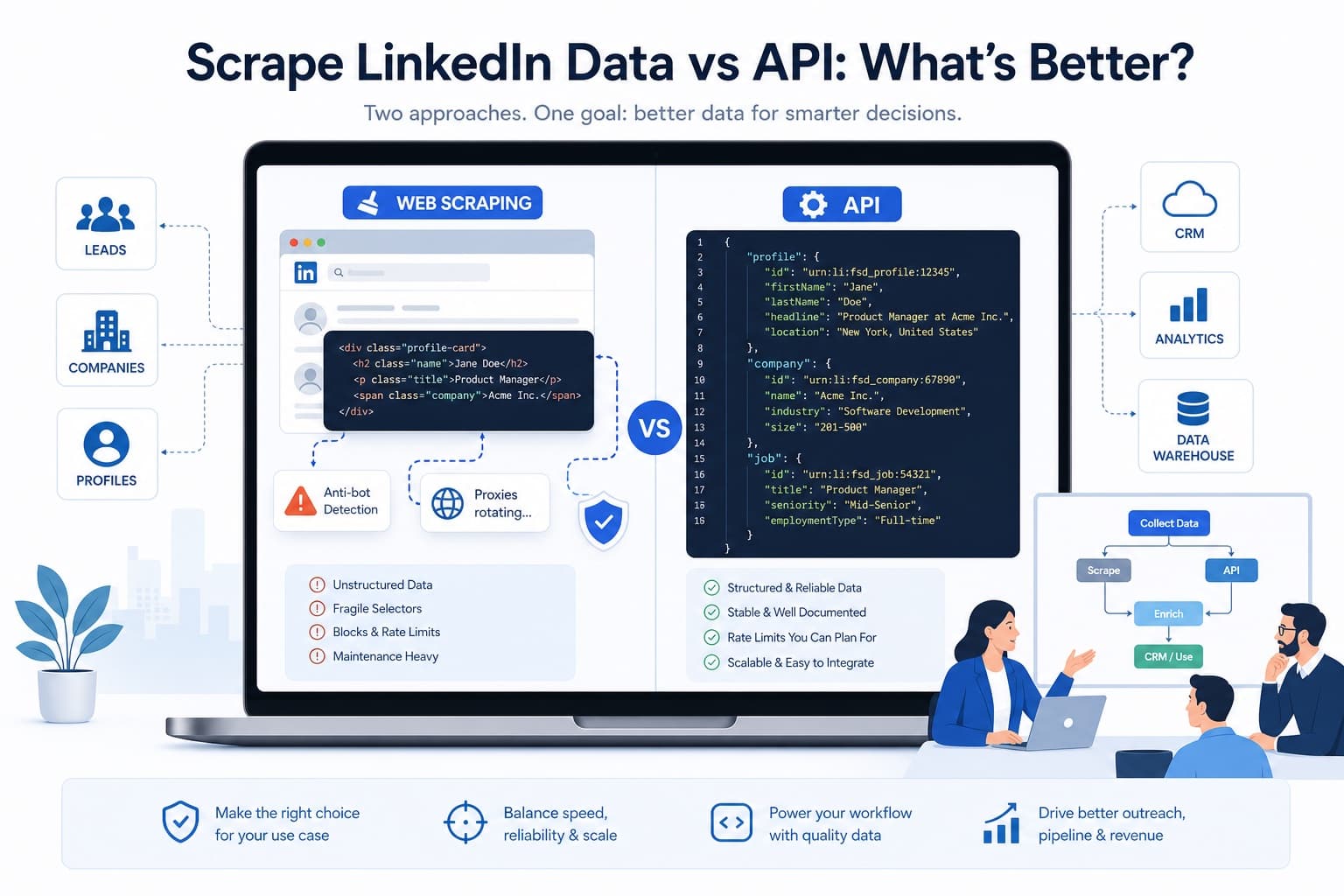
Quick answer: Scraping LinkedIn data gives maximum control and fast experimentation for teams that need custom data extraction from linkedin.com search results, profiles, company pages, and job listings. A LinkedIn data API such as EnvoAPI delivers structured JSON data, predictable scaling, and safer large‑scale data collection for profile data, company data, and job data workflows. This article does not demonize web scraping; instead, it helps sales, marketing, recruiting, and data teams pick the right method for their stack. EnvoAPI is an unofficial professional/public data enrichment API focused on LinkedIn‑like profile, company, and job information for modern SaaS workflows.
LinkedIn Scraping vs API – Quick Comparison
Scraping operates at the UI level of https://www.linkedin.com and https://www.linkedin.com/jobs, while APIs operate at the data layer. Scraping LinkedIn relies on web scrapers and automation tools, APIs use documented endpoints and an API key.
| Aspect | LinkedIn Scraping (Custom Scrapers) | LinkedIn Data API (e.g., EnvoAPI, scraper API layer) |
|---|---|---|
| Setup | Write custom scrapers, manage LinkedIn accounts, browser automation, proxies | Get API access, authenticate with API key, call REST endpoints |
| Cost | Engineering time, proxy traffic, infrastructure, account risk | Transparent pricing per request/credit, minimal infra cost |
| Scalability | Limited by sessions, CAPTCHAs, IP throttling, automated requests caps | Designed for large‑scale data collection with rate limits and SLAs |
| Reliability | Breaks when LinkedIn pages, HTML, or hidden API calls change | Versioned, documented endpoints with stable JSON schema |
| Maintenance | Continuous fixes for selectors, captchas, and flows | Occasional upgrades driven by docs and changelog |
| Data quality | Extract data from HTML; mixed formats, missing fields in scraped data | Normalized profile, company, and job data (job title, company size, industry, location) |
| Control | Full DOM‑level control over linkedin pages and network tab | Control via filters, query parameters, location parameters, and post‑processing |
For B2B data enrichment and CRM data workflows, APIs are usually “production‑ready” because they return structured data with predictable performance and far lower maintenance overhead.
What Does It Mean to Scrape LinkedIn Data?
Scraping LinkedIn means using web scraping techniques to collect public LinkedIn data from linkedin.com profiles, company pages, and job postings. Instead of using official API access, you simulate real users and extract data directly from the HTML and hidden API calls that load profile data and company information.
From a technical perspective, scraping LinkedIn involves:
- Browser automation with tools like Selenium or Puppeteer to simulate user interactions, scroll through LinkedIn search results, and open profiles and company pages.
- HTTP request handling and network tab inspection to understand how LinkedIn loads profile data, company details, and job listings via internal endpoints.
- HTML/DOM parsing to extract profile data such as name, job title, location, experience details, skills, company data, and job details.
- Proxy management with premium proxies and rotating IPs to avoid IP bans and bypass anti‑bot detection mechanisms.
- Handling CAPTCHAs, IP throttling, request fingerprinting, and limits on profile views and connection requests.
Scraping is popular because it appears to offer “all the data” visible on LinkedIn pages and can support mass B2B lead generation, market research, and competitive analysis. A growth marketer might use a LinkedIn profile scraper to:
- Run LinkedIn search or LinkedIn Sales Navigator queries for specific roles and locations.
- Scrape LinkedIn profiles, extract job title, company name, company size, and location.
- Export data to CSV or JSON and enrich CRM data for outreach campaigns.
A data team might write custom scrapers for company pages, collect company details such as industry, headcount, and website, then combine scraped data with internal business development data.
Scraping tools and proxy services illustrate the economic reality:
- Some browser‑level tools charge entry‑level pricing for small volumes of verified emails from LinkedIn Sales Navigator.
- Automation platforms bundle multiple tasks like connection requests, profile visits, and data exports into monthly plans.
- Proxy providers charge by GB of traffic, so large‑scale scraping publicly available data from LinkedIn quickly translates into real infrastructure cost.
The hidden cost is maintenance. LinkedIn frequently adjusts its HTML structure, data loading methods, and anti‑bot controls. Each change can break selectors or hidden API call patterns, forcing teams to debug scripts, update scrapers, and rebuild extraction logic. Over time, scraping LinkedIn data becomes less about writing one script and more about running a permanent engineering project.
Scraping also sits in a complex legal and compliance space. Scraping public LinkedIn data is treated differently from scraping private data; LinkedIn’s terms prohibit unauthorized automated data extraction and explicitly warn that scraping LinkedIn can lead to account bans or restrictions. Teams must balance the greater theoretical volume of data accessible through scraping against platform terms, data protection laws, and their own risk tolerance.
What Is a LinkedIn Data API?
“LinkedIn data API” can mean different things depending on context, so clarity is important for both users and search engines.
Official LinkedIn API
The official LinkedIn API provides a controlled interface for user‑authorized data and partner integrations. It delivers structured data, usually in JSON, but the scope is limited. Access requires application approval and user permission, and the primary focus is on marketing, ads, and selected integrations rather than open profile and company data for enrichment.
LinkedIn scraper APIs
Dedicated scraping APIs sit between raw web scraping and data enrichment. A LinkedIn scraper API handles browser emulation, proxy rotation, and data extraction behind the scenes, then exposes scraped data via HTTP endpoints. You send LinkedIn URLs or search parameters, and the API returns structured data derived from linkedin.com, while you still operate within a scraping model.
Third‑party/public professional data APIs (EnvoAPI)
Public professional data APIs like EnvoAPI aggregate publicly available professional data from multiple sources and expose it via endpoints for profiles, companies, and jobs. They focus on structured data, normalized fields, and integration into SaaS workflows. Instead of scraping LinkedIn pages, you call a profile data endpoint or company data endpoint with inputs such as email, company url, or company name and receive clean JSON.
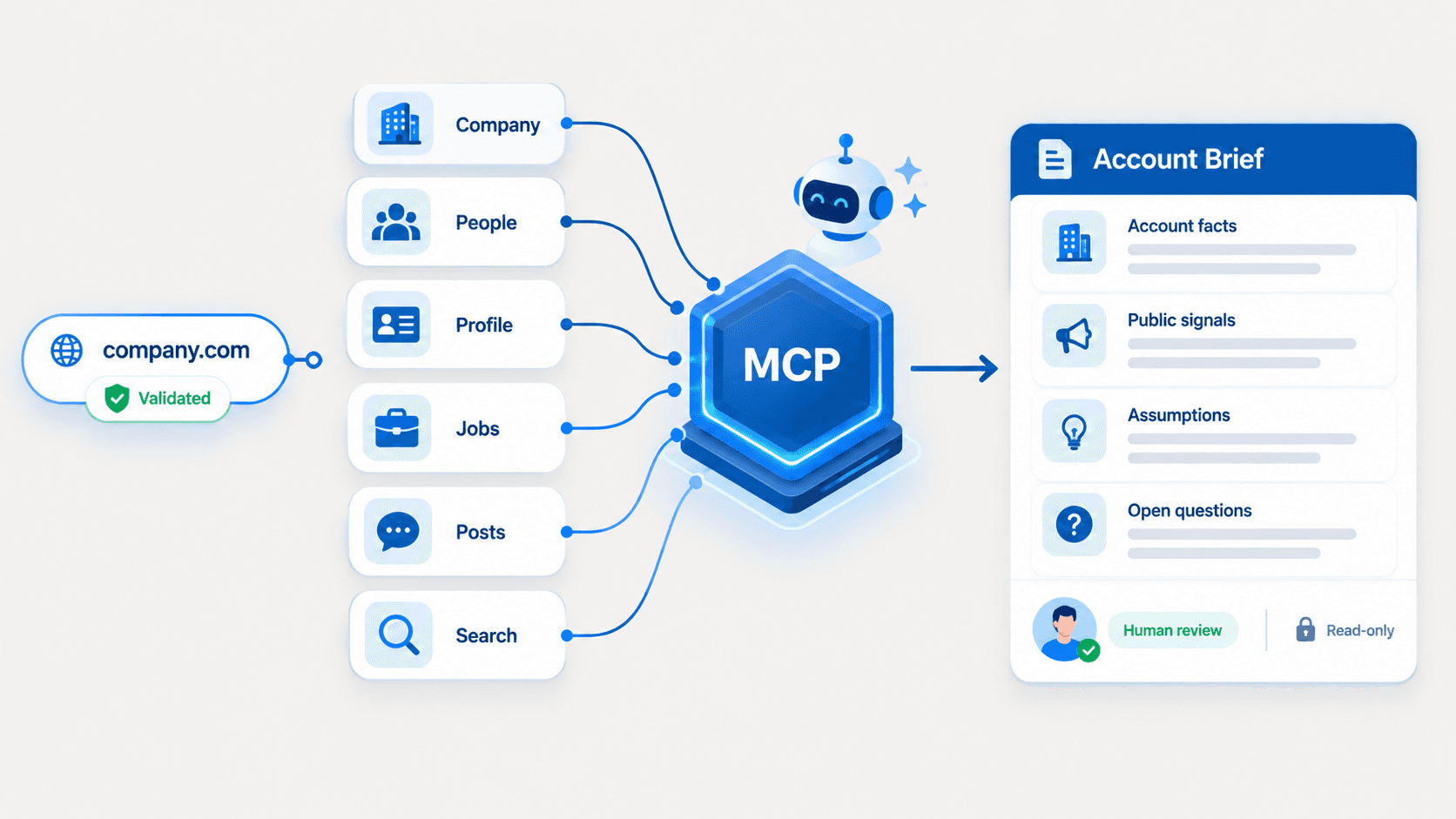
EnvoAPI belongs to this third category. It is an unofficial professional/public data API, not a tool that scrapes the LinkedIn UI. It is designed to provide LinkedIn‑like professional data—job title, company size, company profile, job postings, and other firmographic signals—for sales, marketing, recruiting, product, and data teams. EnvoAPI reduces complexity by giving a structured summary of professional data through endpoints rather than requiring every customer to write custom scrapers or reverse‑engineer LinkedIn’s hidden API calls. You can review the available profile, company, search, job, and post endpoints in the EnvoAPI API documentation.
Scraping vs API – Key Differences
Scraping and APIs both deliver data, but they behave very differently under load and over time.
With scraping LinkedIn:
- You interact with LinkedIn’s HTML structure and internal network calls. LinkedIn often loads profile data via hidden API calls during browsing, which scrapers must detect and replicate.
- You must continuously bypass anti‑bot measures: CAPTCHAs, IP throttling, request fingerprinting, and unusual activity detection. LinkedIn blocks scrapers after a few suspicious profile views or repetitive patterns, leading to account or IP bans.
- You rely on rotating proxies and sometimes premium proxy networks to spread automated requests across multiple IPs and geographic locations.
- You accept that scalars such as certain experience details or skills may be accessible through scraping, but you also accept high maintenance and compliance risk.
With a LinkedIn data API or professional data API:
- You send HTTP requests to documented endpoints, pass parameters such as company name, company url, location, or role keywords, and receive structured JSON data.
- You do not manage proxies or combat anti‑bot measures directly; the provider abstracts that complexity.
- You operate within clear rate limits, often with SLAs, and can plan large‑scale data collection, batch enrichment, and real‑time updates without reacting to every HTML change.
- You benefit from stable schemas, versioning, and predictable response formats, which significantly reduce maintenance and integration overhead.
From a data perspective, scraping can access more fields in theory because it can “see” everything rendered on linkedin.com for a given account. However, APIs keep a clean boundary: they focus on professional/public data, structured fields, and compliant access models. For B2B SaaS teams, the trade‑off is usually clear: use scraping for short‑term experiments or niche fields, and use APIs for scalable, stable production workflows.
When Is LinkedIn Scraping the Better Choice?
Scraping LinkedIn makes sense in well‑defined scenarios where flexibility and speed matter more than long‑term stability.
- Small POC or exploratory research: A founder or growth marketer can scrape LinkedIn profiles from LinkedIn search or Sales Navigator to collect 200–1,000 records and validate a new ICP, market segment, or campaign hypothesis quickly.
- Niche UI‑specific fields: If you require fields visible in LinkedIn’s interface that enrichment APIs do not yet expose—certain badges, profile sections, or interaction details—writing custom web scrapers may be the only practical option.
- Time‑boxed market research: A team can scrape job listings on https://www.linkedin.com/jobs for a specific set of keywords and locations to understand job market trends over a short period, then store the scraped data for analysis.
In these cases, scraping gives direct control over what you collect and how you parse it. However, using scraping as the backbone of continuous, large‑scale data enrichment introduces significant risk:
- LinkedIn’s terms prohibit unauthorized data extraction, including automated scraping of private data and aggressive harvesting of public data.
- Frequent scraping can lead to account restrictions, reduced visibility, or complete bans.
- The maintenance cost of keeping scrapers working against evolving HTML and anti‑bot systems grows steadily as volume increases.
Scraping should therefore be treated as a tactical tool for narrow, time‑boxed tasks rather than the core strategy for ongoing enrichment.
When Is a LinkedIn Data API the Better Choice?
A LinkedIn data API or professional data enrichment API like EnvoAPI is the right choice when data workflows are continuous, high‑volume, and integrated into core business processes.
Sales & SDR teams
Sales and SDR teams use enrichment APIs to transform raw leads into actionable prospects:
- Input: email lists or domains from inbound forms, LinkedIn search exports, or Sales Navigator.
- API: profile data and company data endpoints return job title, company size, industry, location, and other firmographic signals.
- Output: enriched CRM data supports precise routing, prioritization, and personalized outreach campaigns.
This removes manual scraping and manual export data flows, replacing them with automated data collection that fits into tools like HubSpot, Salesforce, or custom sales ops stacks. See how EnvoAPI supports this workflow through its sales intelligence enrichment API.
Marketing & Growth teams
Marketing and growth teams depend on accurate company data and professional data to segment audiences and run ABM campaigns:
- Input: lists of target company names or company urls.
- API: company information endpoints return structured data on company profile, company size, industry, and geography.
- Output: clean segments enable targeted content, ad campaigns, and competitive analysis at scale.
Instead of manually scraping LinkedIn pages, marketers simply call an API and get structured summary fields ready to feed into enrichment tools or CDPs.
Talent & HR teams
Talent and HR teams use job data APIs to map the job market and build sourcing pipelines:
- Input: role keywords, locations, and industry filters.
- API: job data endpoints return job postings with job details, company information, and location parameters.
- Output: structured job search workflows integrate into ATS platforms and sourcing systems without needing scrapers for job listings.
For role-and-location sourcing pipelines, EnvoAPI provides a recruiting workflow that combines job searches, people discovery, and profile-position context
Product & Data teams
Product and data teams rely on enrichment to personalize experiences and analyze user bases:
- Input: user accounts with email, company name, or company url.
- API: profile data and company data endpoints return professional data such as role, seniority, and firmographic attributes.
- Output: personalization logic, tiering, and product analytics improve, driven by professional data rather than raw, scraped data.
Across these teams, EnvoAPI acts as a data layer. It avoids the need to write custom LinkedIn scrapers, manage proxies, and constantly adapt to HTML changes, while still delivering LinkedIn‑like data in a structured, compliant, and scalable way.
Should You Build, Buy, or Use a Hybrid Approach?
The strategic decision is whether to build internal scrapers, buy a data API, or combine both.
Build (internal web scraping stack)
Building your own LinkedIn scraper infrastructure provides maximum control over data extraction logic. You can choose which pages to visit, what elements to extract, and how to structure scraped data. This can be valuable when data extraction itself is a core differentiator or when you need very specific fields.
However, building means:
- Maintaining custom scrapers against frequent HTML and anti‑bot changes.
- Managing proxies, headless browsers, and account health.
- Monitoring legal and compliance risks, including potential conflicts with LinkedIn’s terms and data protection laws.
Buy (data enrichment API like EnvoAPI)
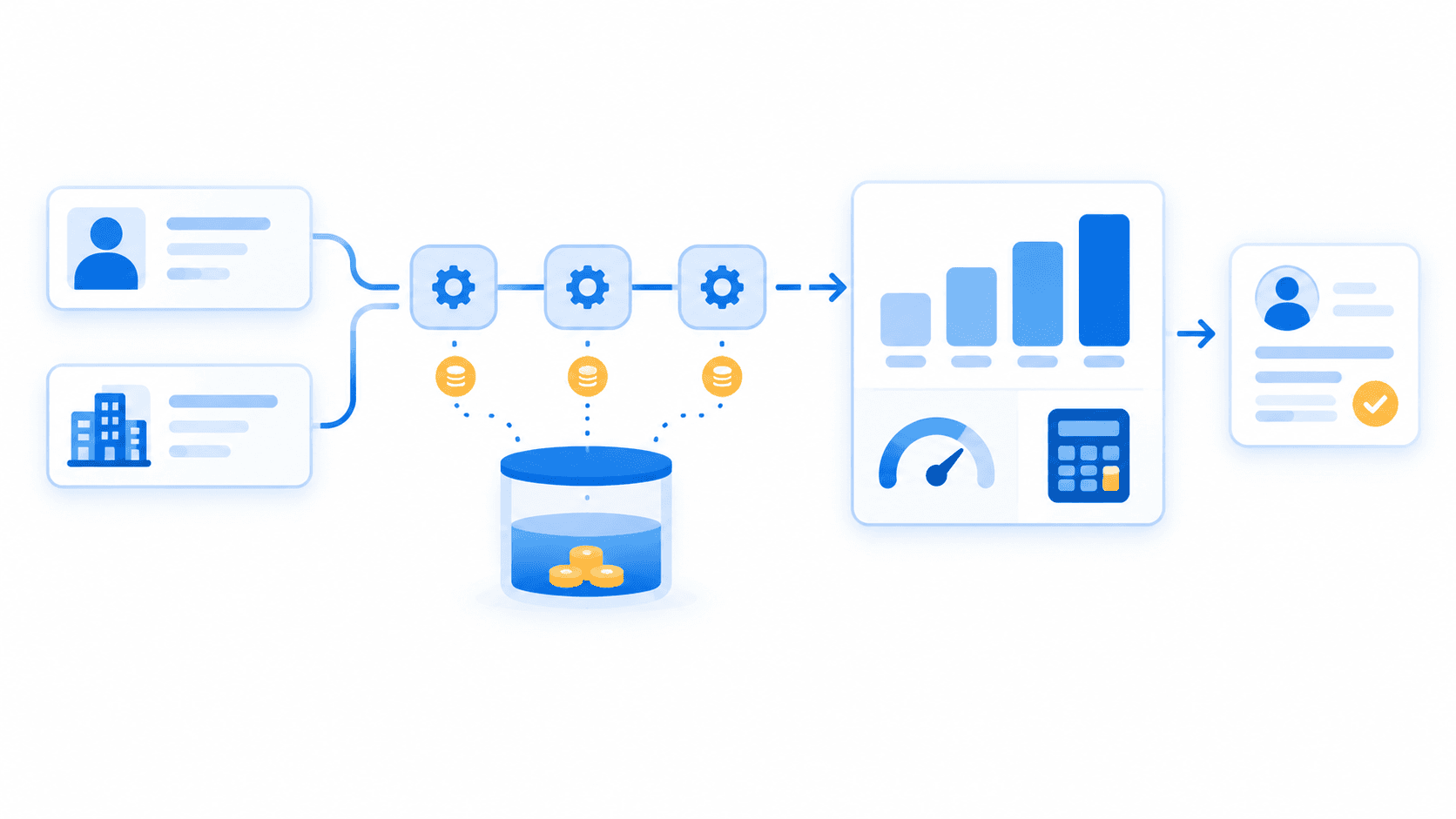
Buying an enrichment‑first API shifts the focus from extraction to usage. Instead of investing in scraping infrastructure, you invest in a reliable, structured data stream:
- Fast setup: integration via API key and documented endpoints.
- Predictable cost: per‑record or per‑credit pricing aligned with usage.
- Lower risk: providers focus on public/professional data and structure access to avoid scraping hazards for customers.
For most B2B SaaS teams, this option delivers the best cost‑benefit ratio because their primary goal is to enrich data, not to manage LinkedIn scraping. For example, EnvoAPI’s CRM enrichment workflow starts from a profile URL or company domain and returns normalized records that teams can map into routing, segmentation, and scoring fields.
Hybrid approach
Some mature organizations use a hybrid model:
- 80–90% of use cases rely on professional data APIs for profile data, company data, and job data workflows.
- A smaller portion uses dedicated web scrapers or scraper APIs for special cases where unique UI fields are required.
The decision depends on:
- Monthly data volume (hundreds vs tens of thousands vs millions of records).
- Sensitivity to account bans and ToS violations.
- Internal engineering capacity and appetite for ongoing scraping maintenance.
- Legal and compliance constraints in markets governed by strict data protection laws.
A practical way to evaluate is to run a side‑by‑side test: compare your current scraping stack with EnvoAPI using a sample dataset and 100 free credits, then measure differences in maintenance time, data quality, and integration speed. You can validate representative profile, company, search, and job calls in the EnvoAPI Playground.
How to Choose a LinkedIn Data API Provider
Selecting the right LinkedIn data API or professional data API affects both your product and your operations. You should evaluate vendors on concrete criteria, not vague claims.
Endpoint coverage
Look for endpoints that cover:
- LinkedIn‑like profile data: name, job title, seniority, location, skills.
- Company data: company name, company url, company profile, company size, industry, location.
- Job data: job postings, job details, company information, location parameters, posting dates.
Data freshness and latency
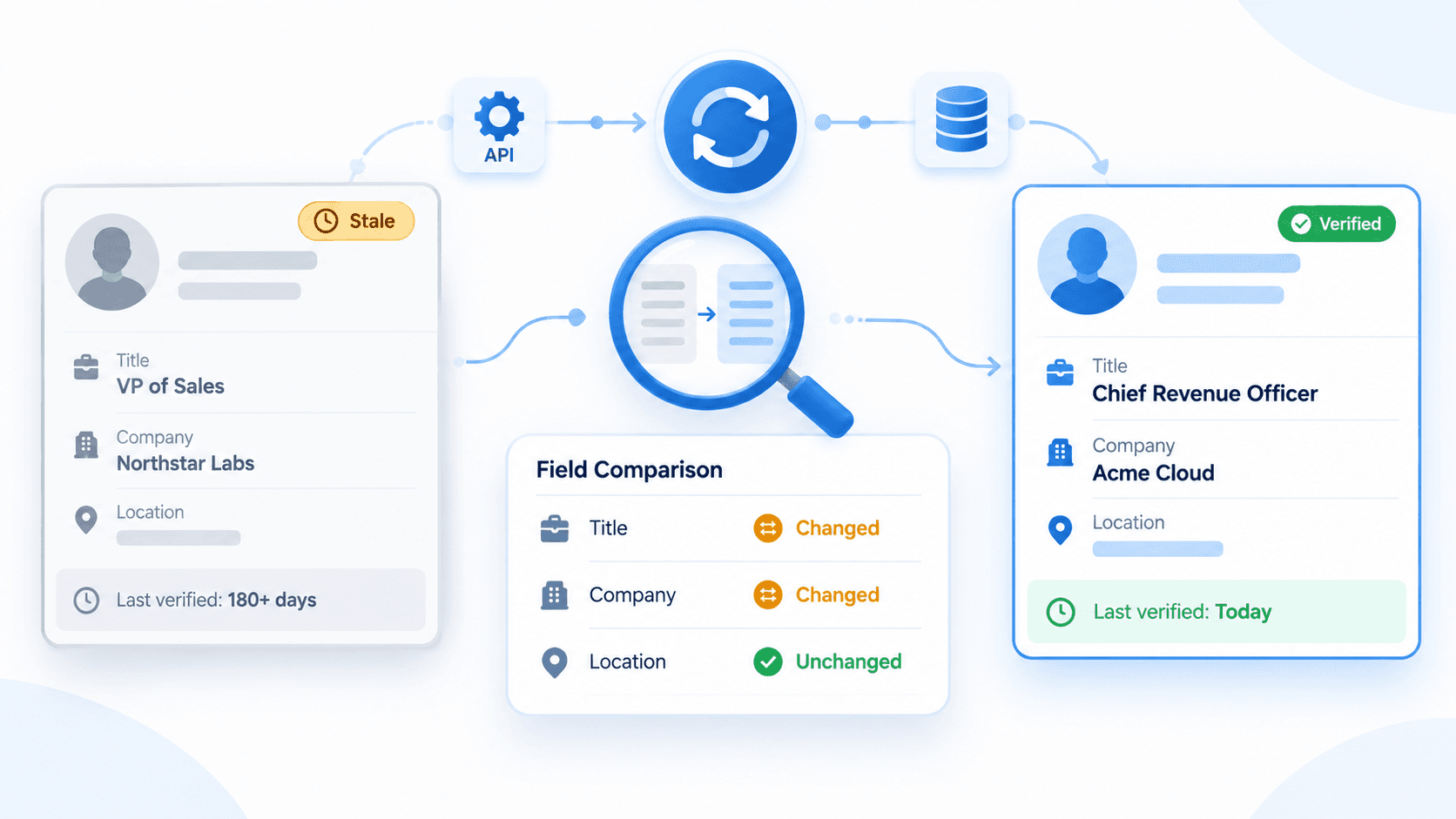
Ensure the provider updates data frequently enough for your use case and supports near‑real‑time access when required. Stale job data or outdated company details reduce the value of your pipelines.
Response structure and schema
The API should return structured JSON data with a clear, stable schema. Fields like job title, company name, company size, industry, and location must be consistent so you can map them cleanly into your CRM, warehouse, or product database.
Documentation and developer experience
High‑quality documentation, sample output, quickstart guides, code samples, and SDKs reduce integration time. This matters for teams that want to move from “idea” to production in days, not months.
Pricing and rate limits
Transparent pricing per record or credit and clear rate limits help you plan large‑scale data collection. Providers should offer paths to increase limits smoothly when your workloads grow.
Support and onboarding
Technical support, onboarding assistance, and consultative help add real value. You want a partner that understands lead enrichment, business development workflows, and data extraction realities.
Compliance and controls
Finally, check how the provider handles public data, opt‑out requests, audit trails, and security controls. The provider should respect data protection laws and avoid pushing you into scraping LinkedIn in ways that conflict with platform terms.
EnvoAPI is designed to meet these criteria for SaaS teams that want unofficial, LinkedIn‑like professional data without building and maintaining complex scraping stacks. It focuses on structured data, enrichment‑friendly schemas, and integration with real sales, marketing, recruiting, and product workflows. Its market research workflow also shows how search, company, job-count, and post data can support company tracking and demand analysis.
Final Verdict – Scraping or API?
Scraping LinkedIn and using a LinkedIn data API both have legitimate roles, but they serve different strategic needs.
For an early‑stage startup with one growth marketer and short‑term goals, scraping LinkedIn profiles or company pages with a basic LinkedIn scraper can deliver quick market research and initial lead lists. The flexibility is high, and the direct cost can be low, as long as the team understands the risks around account health, maintenance, and platform terms.
For a scale‑up or enterprise B2B SaaS company with dedicated sales, marketing, recruiting, and data teams, an API‑first approach offers far more value. Structured JSON data, predictable scaling, clear compliance boundaries, and minimal maintenance are essential when data enrichment powers outbound prospecting, ABM, talent sourcing, and product personalization.
A simple decision framework:
- Team small, objectives short‑term, low compliance pressure: Scraping with clear risk awareness.
- Team growing or established, data central to operations, higher compliance expectations: LinkedIn‑like professional data API as the primary layer.
Scraping is a tactical method for data extraction from linkedin.com. A LinkedIn data API like EnvoAPI is strategic infrastructure for long‑term B2B data enrichment.
Primary CTA: Get API Key\ Secondary CTA: View API Documentation
You can start by connecting to EnvoAPI, enriching a sample of your leads or job postings with 100 free credits, and measuring how much engineering effort, maintenance, and risk you save compared with relying on scraping LinkedIn data.